
Canva AI vs PageOn.ai: I Tested Both with the Same Prompt — Here's What Happened

Canva recently launched Canva AI — a chat-based presentation generator built into the world's most popular design platform. I tested it head-to-head against PageOn.ai using the exact same prompt to see how two very different approaches to AI presentations compare in 2026.
Here's the short version: Canva AI leverages the world's most popular design platform, but its AI-generated content lacks the depth you'd expect. PageOn.ai takes a different approach that prioritizes substance. Let me show you what I found.
This review is part of our comparison of 7 AI presentation makers.
How We Tested: Same Prompt, Default Settings
I used the same topic — "AI Trends in 2026" — on both platforms with default settings, simulating a first-time user experience. No manual editing, no template swapping, no post-generation touch-ups. What you see in this article is what each tool produced out of the box.
Canva AI generated 15 slides in about 30 seconds. PageOn.ai is also streaming: the first slide shows up in about 10-20 seconds, with the full 7-slide deck completing in 2-3 minutes as it runs web searches and builds data visualizations in real time. The difference in quantity made the gap in quality even more striking.
Quick Verdict
| Canva AI | PageOn.ai | |
|---|---|---|
| Input Experience | Chat-first, friendly and familiar | Single prompt with AI agent |
| AI Research | No visible web search, no sources in output | Auto web search with visible sources |
| Content Depth | Generic filler, zero real data | Specific data points, cited sources |
| Visual Design | Same two-column layout on 13/15 slides | Every page uses a different layout |
| Image Quality | AI-generated, no watermarks but decorative only | User-selected web images, contextually relevant |
| Manual Editing | Full Canva Editor (excellent) | Basic block editing |
| AI Chat Editing | Misunderstands intent, regenerates instead of editing | Reliable agent that edits in place |
| Version History | Good, can restore any version | Basic undo |
| Best For | Users who want a starting point to redesign in Canva | Users who want a ready-to-present deck |
| Free tier | ~50 AI uses total | 1 project, 10 msgs |
| Paid from | $15/mo | $7.49/mo (annual) |
The Input Experience: Both Get This Right
Unlike older tools that dump a wall of settings on you before you've typed a word, both Canva AI and PageOn.ai start with a simple text input.
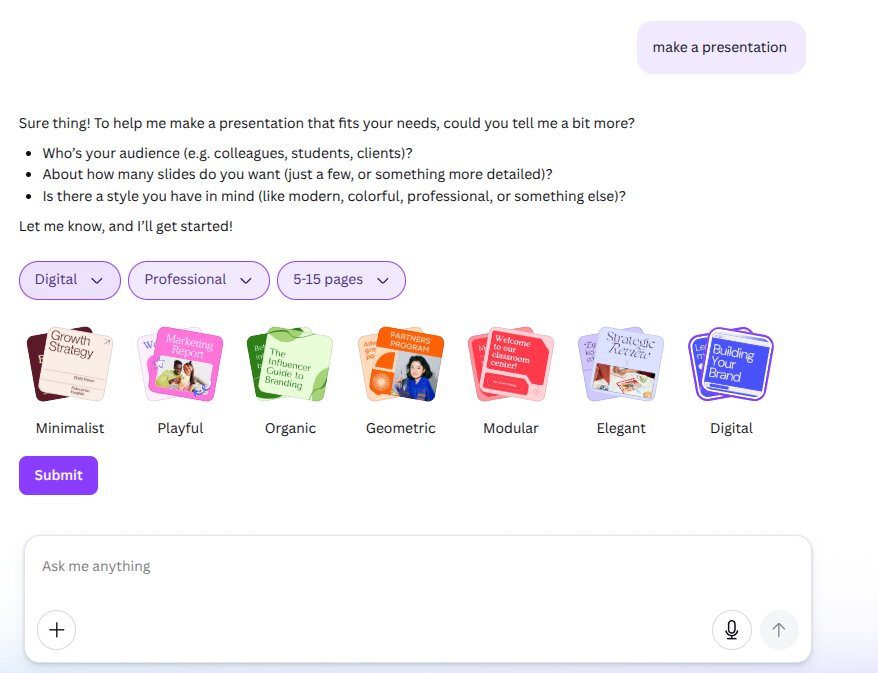
Canva AI opens with a clean chat interface — type your topic, and the AI gets to work. After generating an outline, it asks smart follow-up questions: audience, style preference, and page count. The settings appear as compact dropdowns with visual previews — you can choose from 7 style themes (Minimalist, Playful, Organic, Geometric, Modular, Elegant, Digital) and 3 audience types (Casual, Professional, Educational). It's well-designed and feels natural within the conversation flow.
PageOn.ai takes a similar chat-first approach, but adds a critical step: before asking you about style or length, it searches the web for the latest information on your topic and shows you what it found. You can see the sources it's pulling from. Then it recommends a theme based on your content — not just generic options, but a theme matched to your topic. It also lets you preview and select images before generation begins, so you're choosing visuals that actually match your content rather than leaving it entirely to the AI.
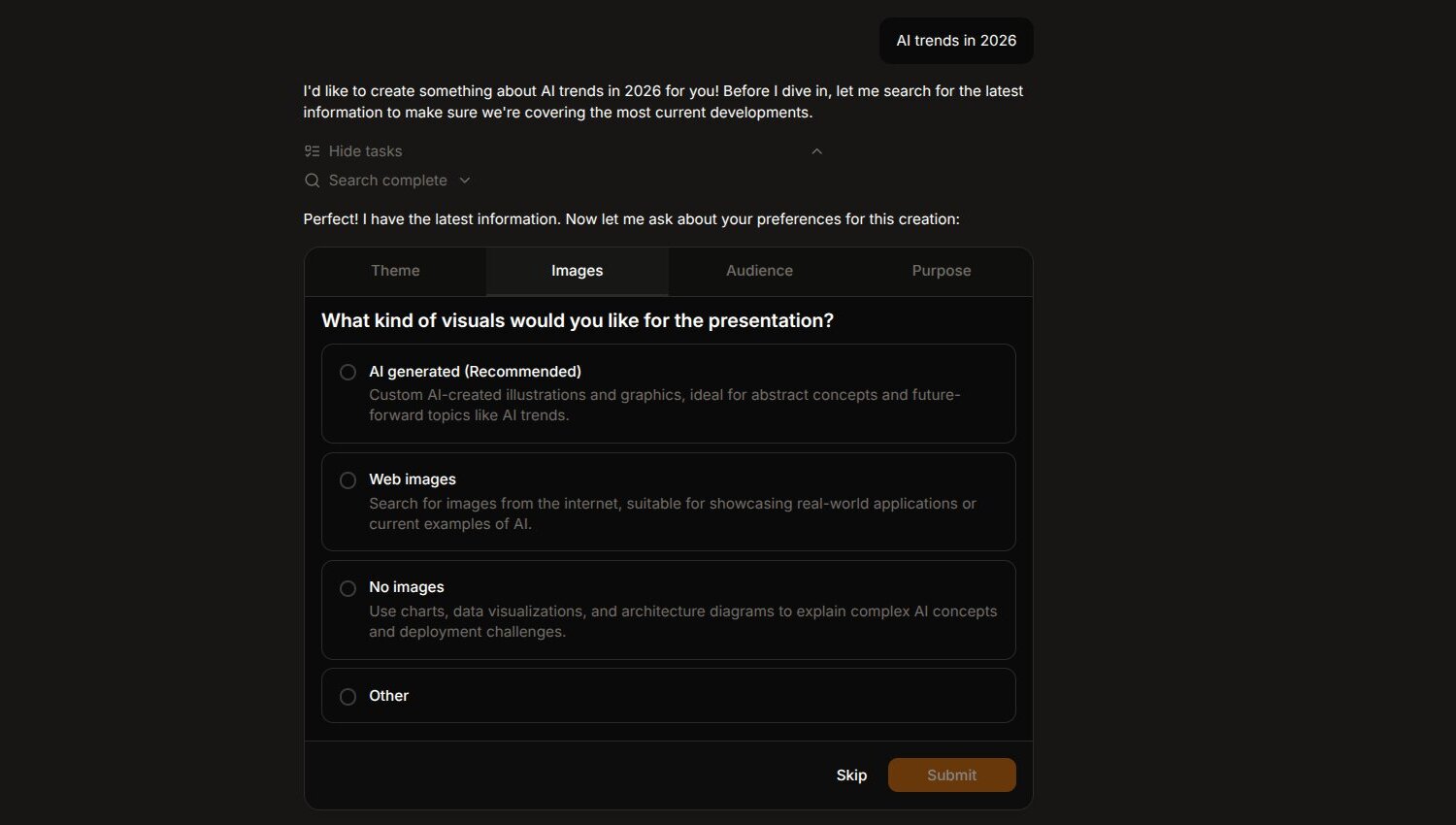
The input experience is where Canva AI feels most competitive. The conversational setup with visual theme previews is genuinely well done. But the key difference happens beneath the surface: PageOn.ai is researching your topic while Canva AI shows no sign of searching the web — no sources displayed, no references in the output.
Content Quality: Where the Gap Becomes Impossible to Ignore
This is where the comparison stops being close.
Canva AI produced 15 slides covering 10+ AI topics — generative AI, personalization, ethical AI, edge computing, sustainability, and more. The problem isn't the topics. It's that every single one is hollow.
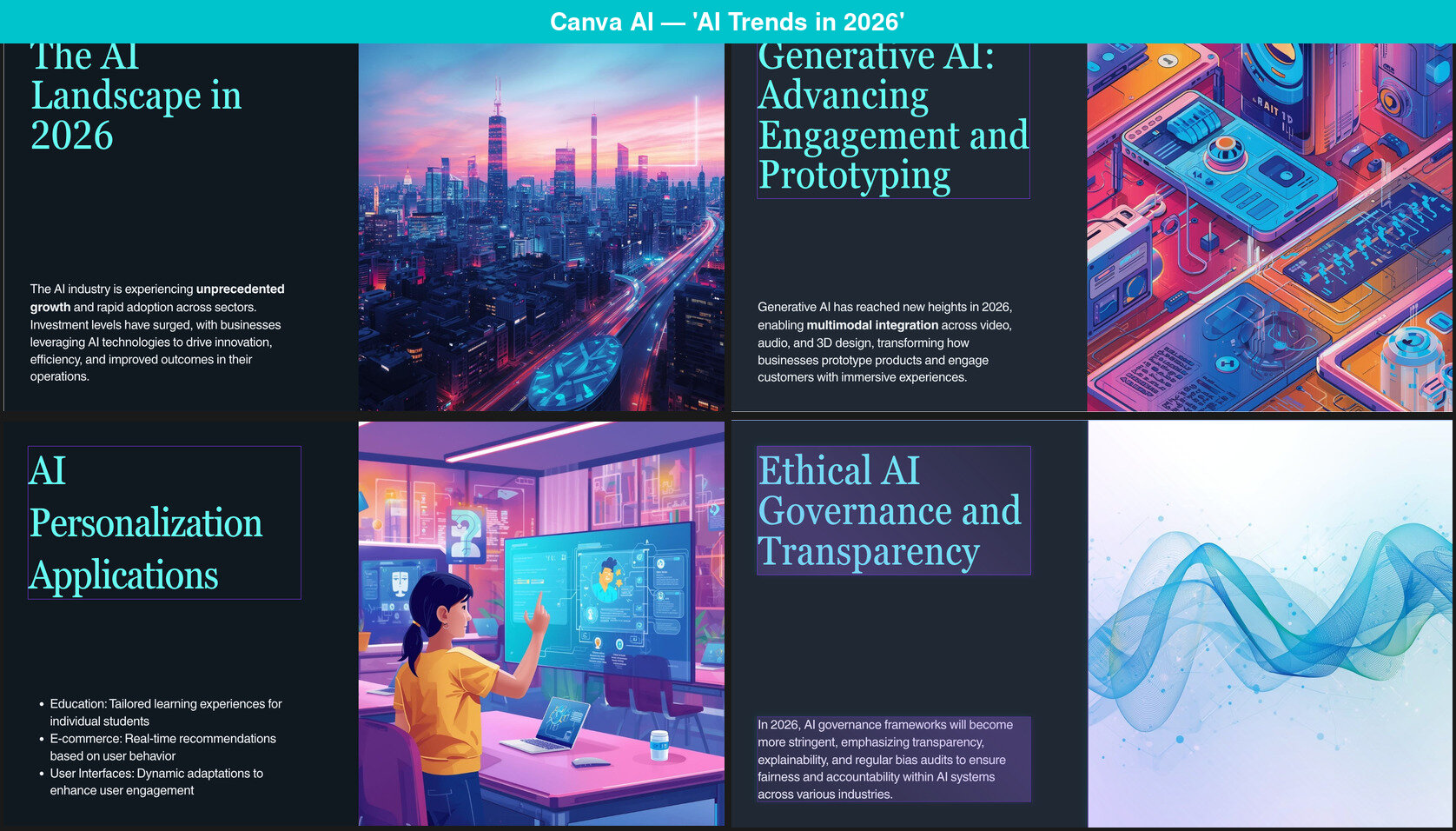
The "AI Landscape in 2026" slide says: "The AI industry is experiencing unprecedented growth and rapid adoption across sectors." That sentence could have been written about any technology in any year. The "Edge AI" slide claims "Over 60% of AI models are now deployed on devices" — a specific-sounding statistic with no source, no context, and no way for the audience to verify it. Unsourced statistics are arguably worse than no statistics at all.
Across 15 slides and 10+ topics, not a single slide contains a verifiable fact, a named source, or a concrete example. Every content slide follows the same formula: a bold claim in the heading, one to two sentences of generic description, and three bullet points that could apply to any technology in any decade. The slides aren't wrong — but they lack specificity. If you already have your own data and talking points, this might not matter. If you're relying on AI to bring substance, it's a gap.

PageOn.ai generated 7 slides — half the count — but each one had substance. Specific data like "85% Enterprise Production Rate" for agentic AI adoption, with Anthropic cited as the source. An interactive line chart tracking model performance from 2022 to 2026. A reference to "workslop" — the Harvard Business Review term for AI-generated content that looks polished but says nothing meaningful. (The irony of Canva's output embodying the very concept that PageOn references is hard to miss.)
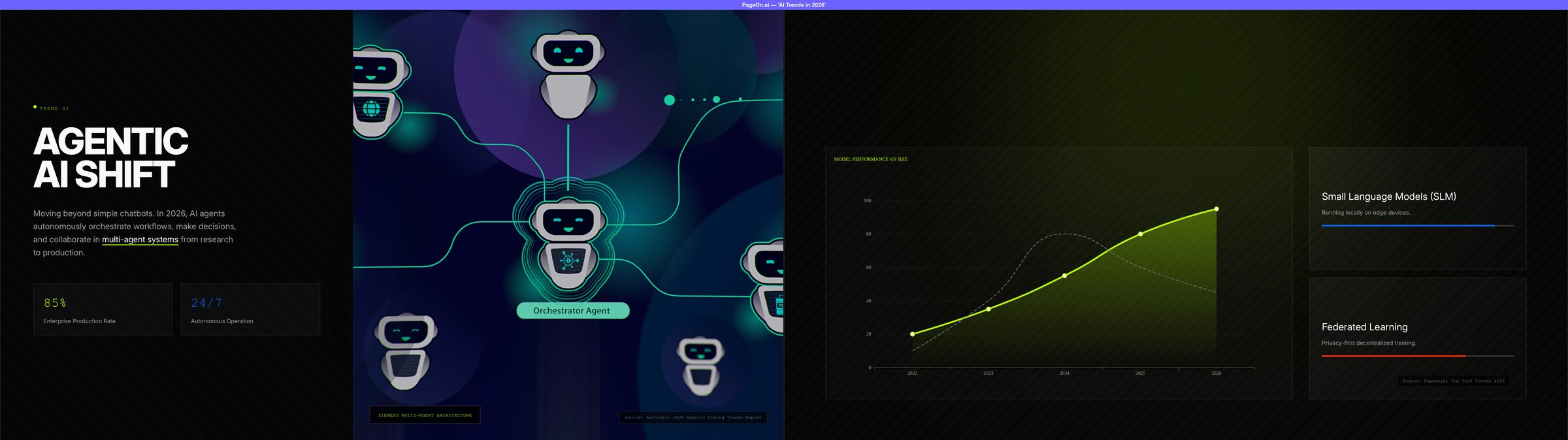
The core issue: Canva AI shows no evidence of web search — there's no search step visible during generation, and the output contains no sources, no citations, and no data that couldn't come from a language model's training data alone. PageOn.ai runs real-time searches, retrieves current information, and cites where it came from. For a topic like "AI Trends in 2026," this difference is the difference between a useful presentation and a collection of well-formatted empty sentences.
Visual Design: Polished Monotony vs. Intentional Variety
Canva's design DNA is strong. The dark theme with cyan accents looks clean and modern. The typography is well-chosen. If you look at any single slide in isolation, it looks professional.
The problem appears when you view them as a deck. 13 out of 15 slides use the exact same layout: large title on the left, paragraph text below it, full-height image on the right. The remaining two use a "title + image gallery" format. There are no data charts, no comparison tables, no timelines, no flow diagrams — nothing to break the visual monotony.
PageOn.ai's output was different on every page. A bold typographic cover, a data-driven chart slide, a full-bleed background image with text overlay, multi-column card layouts, and a clean key-takeaways summary. The dark theme with neon-green accents felt cohesive but never repetitive. One slide featured a custom orchestrator-agent architecture diagram that was actually informative — not just decorative.
Both tools produce dark-themed, modern-looking presentations. But Canva gives you one layout repeated 13 times. PageOn gives you 7 unique pages that hold attention.
Images: No Watermarks, but No Information Either
Here's an area where Canva AI improves on some competitors. Every image in the output is AI-generated, which means no watermarks. If you've tried Gamma's default settings and seen Dreamstime logos plastered across every slide, Canva's clean images feel like a relief.
But the images serve no informational purpose. The "Generative AI" slide shows an isometric illustration of random electronic devices that has nothing to do with generative AI. The "Conversational AI" slide uses the classic robot-face-meets-human-face composition that was already a cliché in 2020. The "AI Personalization" slide shows a cartoon character touching a screen — technically related to the topic, but adding zero insight.
These images are wallpaper. They fill space and set a mood, but they don't help your audience understand anything better.
PageOn.ai takes a different approach: before generation, it searches for real images related to your topic and lets you choose which ones to use. The result is images that actually relate to the content — plus the option to use real photographs instead of AI illustrations. Only one slide in PageOn's output had a watermark issue, compared to Canva's zero — but PageOn's images carry information, while Canva's images carry only aesthetic.
The Editing Experience: Two Very Different Strengths
Manual Editing: Canva Wins Decisively
This is Canva's home turf, and it shows. Click "Use Canva Editor" and you're in one of the most mature design editors on the web. Drag elements, swap images from Canva's massive library, adjust colors, add animations, apply brand kits — it's all there. If you treat the AI output as a rough draft and plan to polish it yourself, Canva gives you world-class tools to do that.
PageOn.ai's manual editor is more limited — basic block rearrangement and text editing, without the rich component toolbars Canva offers. If hands-on, pixel-level design control is important to you, Canva has a clear advantage.
AI Chat Editing: PageOn Wins Decisively
I asked Canva AI to "add some charts to illustrate the key trends." It responded: "I'll add some charts to your presentation... I'll do my best to include clear, modern visuals."
What it actually did: generated three entirely new presentations from scratch. Not edited the existing one. Not added charts to existing slides. Created three complete new decks — none of which contained a single data chart. Just more AI-generated decorative images.
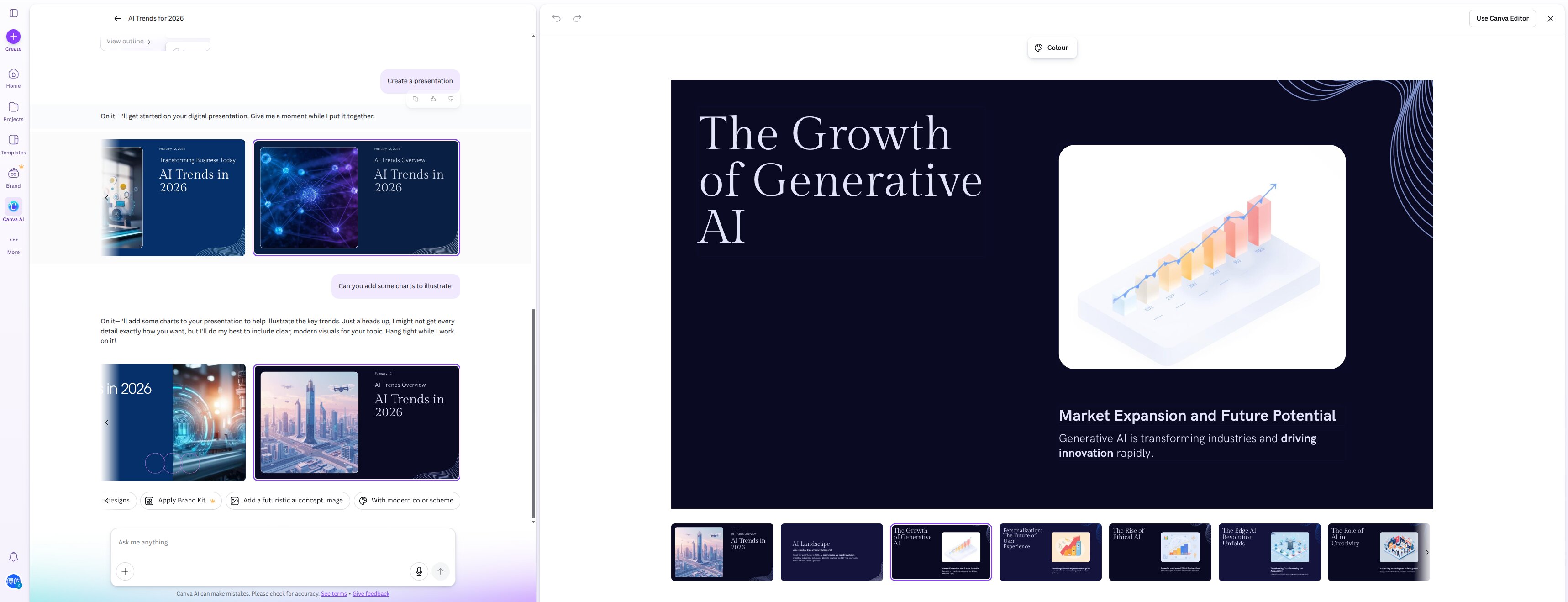
This reveals a fundamental limitation: Canva AI's "editing" through chat is actually regeneration. It doesn't modify your existing work — it starts over. If you've already spent time arranging slides or tweaking content, a chat edit can wipe that out.
PageOn.ai's agent edits in place. When I asked it to add sources, it added real, verifiable citations to the existing slides — Anthropic, Nature, Harvard Business Review, Capgemini. The content I'd already arranged stayed intact. The agent understands the difference between "improve this" and "replace this."
One bright spot for Canva: its version history lets you restore any previous version from the chat timeline. So if an AI edit goes wrong, you can always go back. It's a well-designed safety net for an AI editing experience that clearly needs one.
Who Should Use Which?
Choose Canva AI if:
- You're already in the Canva ecosystem — your team uses Brand Kits, shared templates, and Canva's collaboration features
- You want a fast starting point that you plan to redesign manually in Canva's excellent editor
- You already have your own content and data — you just need layouts and images to arrange it yourself
- Watermark-free AI-generated images are a priority for your workflow
Choose PageOn.ai if:
- You want AI to do the research, writing, and design — not just the formatting
- You need content grounded in real, current, cited information
- You want visual variety and data visualizations without manual effort
- You want an AI agent that reliably improves your deck when you ask it to
See how Canva AI compares to six other AI tools in our full roundup of 7 AI presentation makers.
The Bottom Line
Canva AI is a natural extension of Canva's design platform. The input experience is smooth, the settings are thoughtfully designed, and the Canva Editor behind it is genuinely excellent. If you think of AI presentations as "AI generates a rough draft, then I do the real work," Canva is a solid choice.
But if you think of AI presentations as "AI creates something I can actually present," PageOn.ai is in a different league. Its output has real content, cited sources, interactive charts, and layouts that don't repeat. The 7-slide deck from PageOn contained more actual information than Canva's 15 slides combined.
Here's what stuck with me: Harvard Business Review recently coined the term "workslop" — AI-generated content that looks polished but says nothing meaningful. It's a real risk with any AI tool. The question is whether the tool helps you avoid it or contributes to it. In my test, Canva's output leaned toward surface-level content, while PageOn's research-driven approach produced slides with verifiable claims and cited sources. That difference matters when your audience is paying attention.
Ready to see the difference? Try PageOn.ai with your next presentation topic. One prompt, one deck, real content — no redesign required.