
Gamma vs PageOn.ai: I Tested Both — Here's Which AI Presentation Tool Is Actually Better

I tested Gamma and PageOn.ai side by side using the exact same prompt to see which AI presentation tool actually delivers better results in 2026. If you're looking for a Gamma alternative, this comparison will help you decide.
Here's the short version: PageOn.ai produces significantly better output with less effort. But Gamma has genuine strengths too. Let me walk you through what I found.
This review is part of our comparison of 7 AI presentation makers.
How We Tested: Same Prompt, Default Settings
To keep this comparison fair, I used the same topic — "AI Trends in 2026" — on both platforms with default settings, simulating what a first-time user would experience. No manual tweaking of image sources, templates, or content density. This reflects the out-of-box experience most users will have on their first try.
Quick Verdict
| Gamma | PageOn.ai | |
|---|---|---|
| Input Experience | Multiple setup steps | Single text input |
| AI Research | No visible search | Auto web search with sources |
| Content Depth | Generic, no real-time data | Specific data points & trends |
| Visual Design | Clean but repetitive layouts | Dynamic layouts with animations |
| Image Quality | Stock photos (default) | User-selected web images |
| Manual Editing | Rich component toolbars | Basic block editing |
| AI Chat Editing | Fast but unreliable on complex tasks | Reliable agent with real sources |
| Interactive Elements | Embeds & buttons | Charts, animations & overlays |
| Best For | Users who want full manual control | Users who want AI to handle the details |
| Free tier | 400 credits (~10 decks) | 1 project, 10 msgs |
| Paid from | $8/mo | $7.49/mo (annual) |
The Input Experience: Setup Wizard vs. Single Prompt
The first difference hits you immediately.
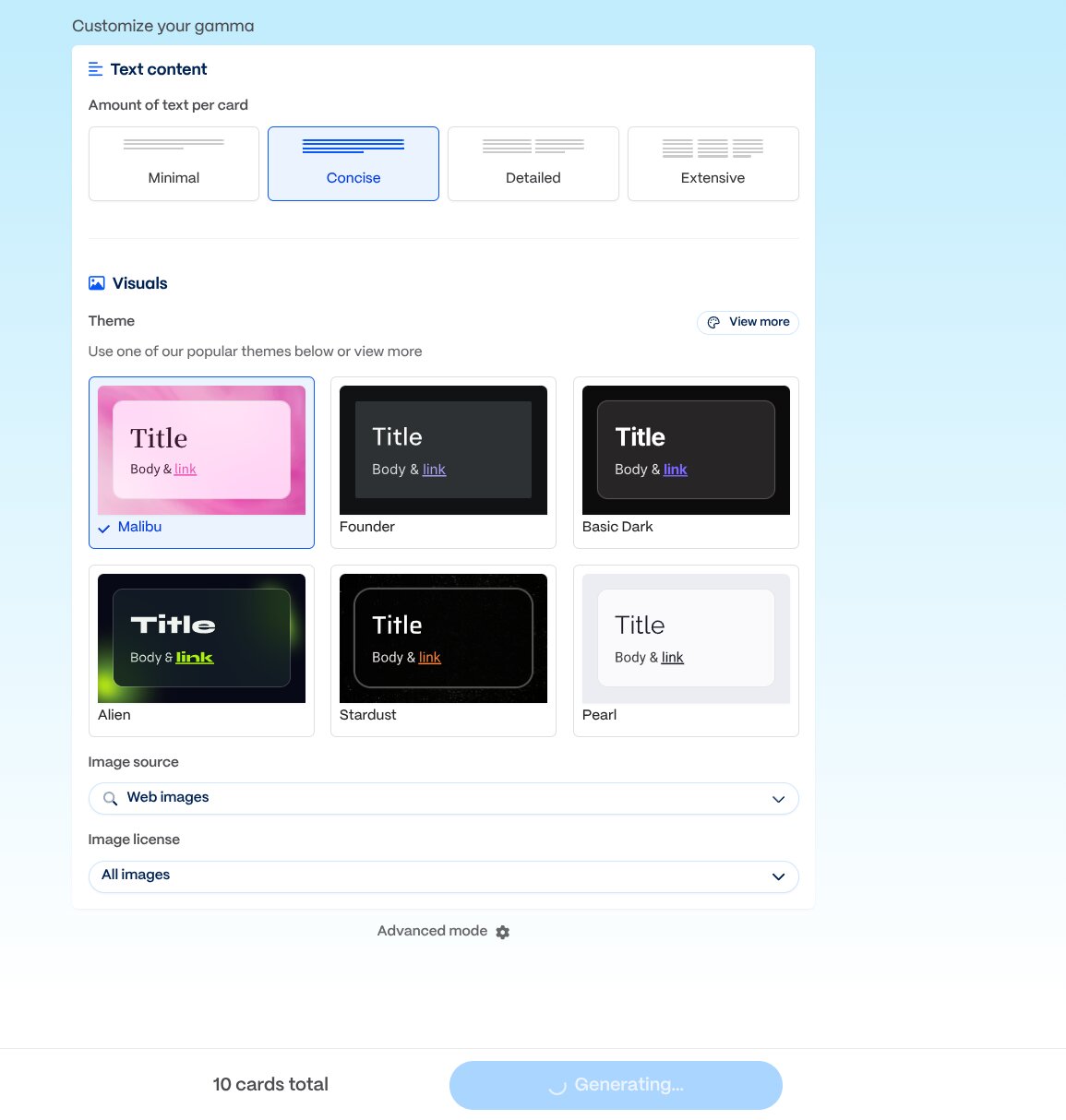
Gamma greets you with a multi-step setup process. You choose your output format, then configure the number of pages, image type, theme, and content density — all before generation starts. It feels like a traditional web tool that added AI features on top. The sidebar in the editor is packed with options.
This isn't necessarily bad if you know exactly what you want. But for a first-time user, the cognitive load is real. You're making design decisions before you've even seen what the AI can do.
PageOn.ai takes a fundamentally different approach. You type your topic into a single input box — that's it. The AI takes over from there: it searches the web for the latest information on your topic, shows you the sources it found, then asks smart follow-up questions about your audience, purpose, and image preferences. It even recommends a theme based on your content.
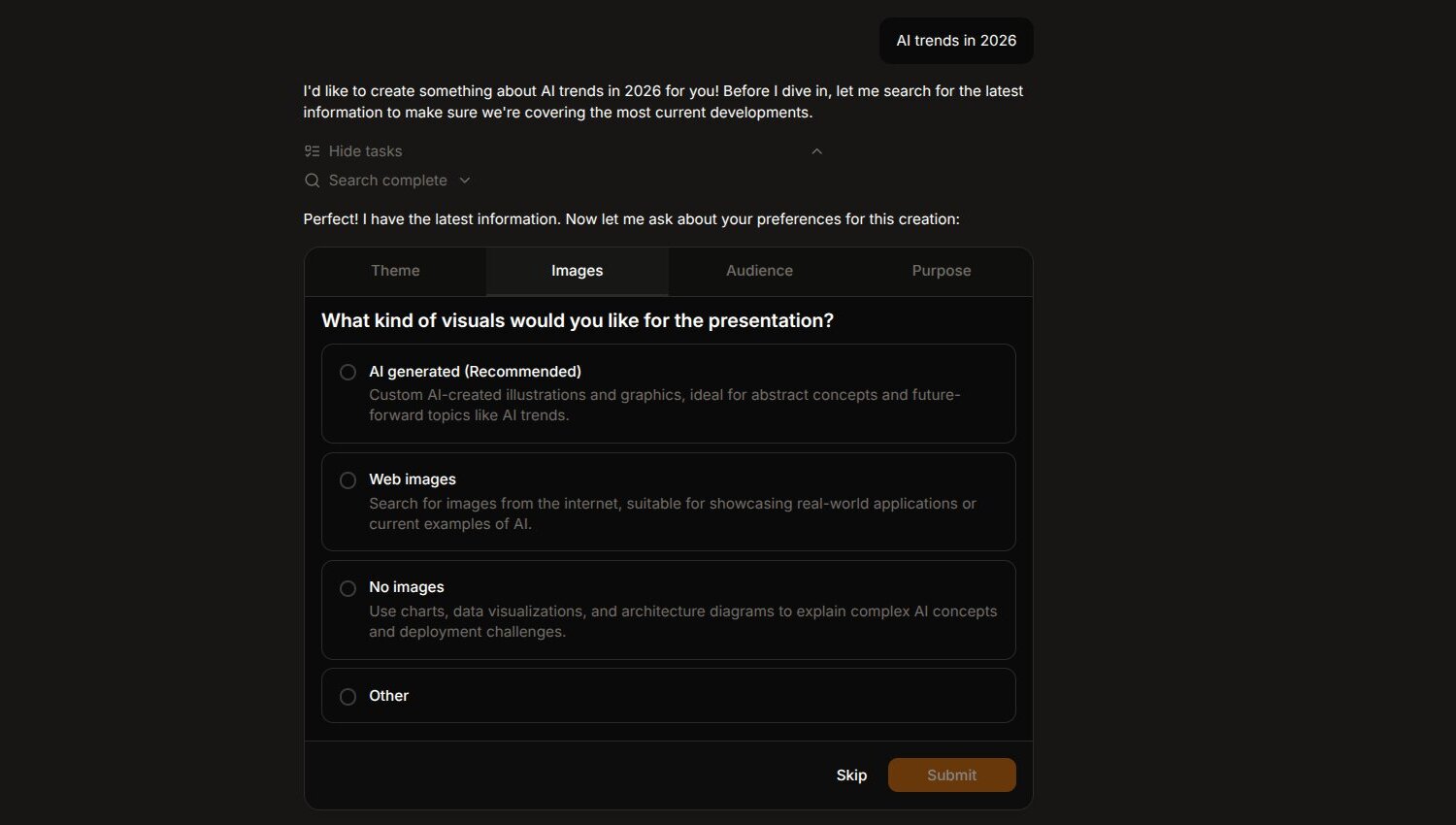
This is what people mean by "AI-native" design. Instead of you configuring the tool, the tool configures itself around your intent.
Content Quality: Generic Text vs. Real-Time Research
This is where the gap becomes obvious.
Gamma is fast — the first slide appears within 10 seconds of clicking generate, and the full 10-slide deck streams in under a minute. PageOn is also streaming: the first slide shows up in about 10-20 seconds, with the full deck completing in 2-3 minutes as it runs web searches and builds data visualizations in real time.
Gamma's output for "AI Trends in 2026" covered 8 topics across 10 slides — AI agents, Chinese AI models, generative AI in apps, the AI bubble, hardware, regulation, and more. The problem? Every topic got just 2-3 sentences of surface-level commentary. "DeepSeek shocked the industry with top-tier performance" — but no benchmark numbers, no specific comparisons, no sources.
The content read like a general summary written from memory rather than from research. For a presentation about 2026 trends, there was remarkably little information that was actually specific to 2026.
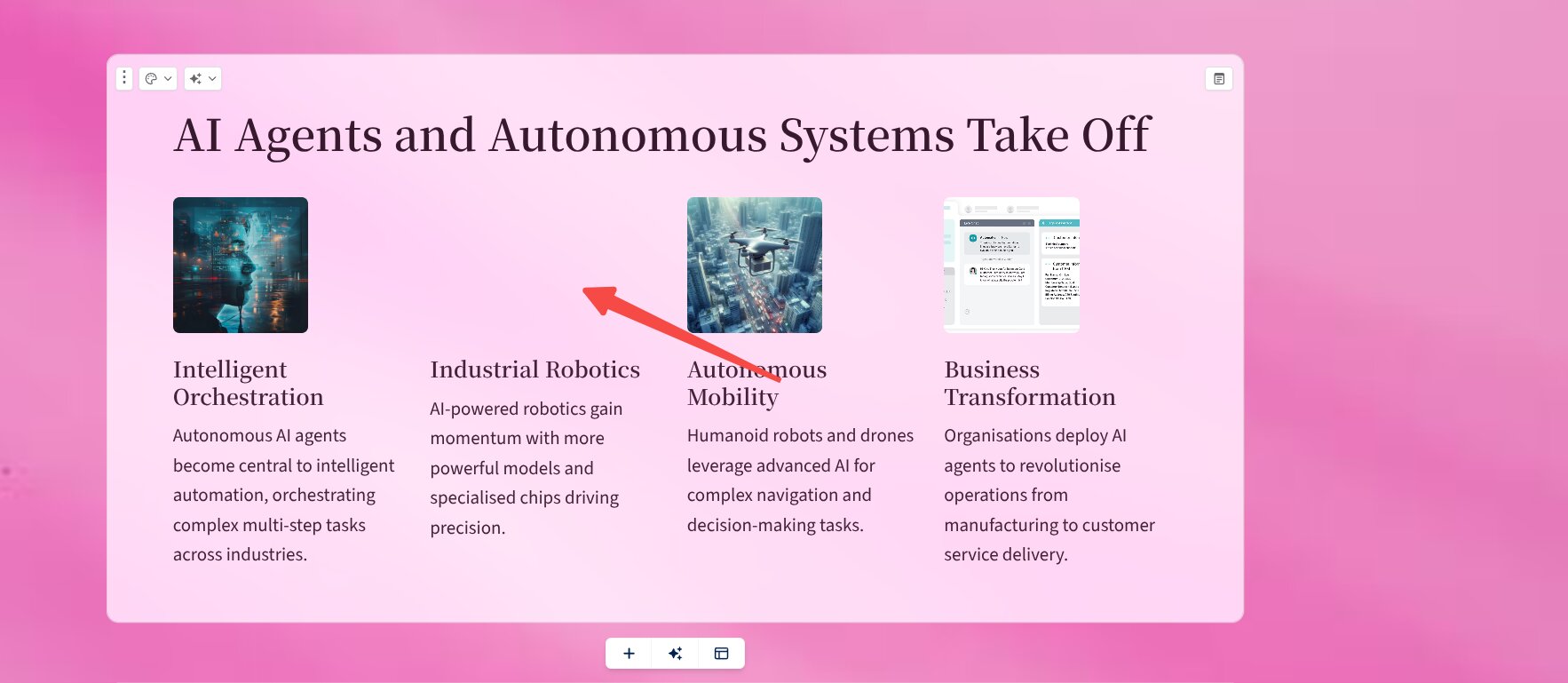
PageOn.ai's output told a different story. The presentation covered fewer topics (7 slides vs. 10), but each one had substance: specific data points like "85% Enterprise Production Rate" for agentic AI adoption, a performance-over-time chart tracking model improvements from 2022 to 2026, and references to current concepts like "workslop" — the Harvard Business Review term for AI-generated content that looks polished but lacks substance.
The fact that PageOn picked up a concept coined by HBR in late 2025 tells you something about its real-time research capabilities. Gamma's output didn't reference anything that couldn't have been written a year ago.
Visual Design: Template Cycling vs. Intentional Layout
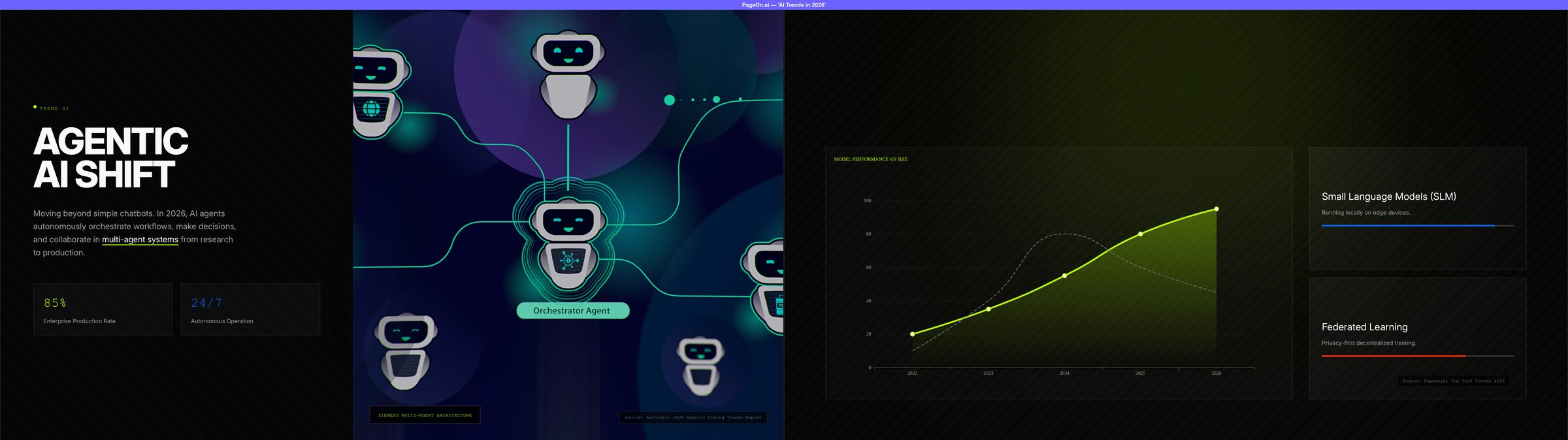
Gamma's design is clean — no question about that. The pink-and-white color scheme is pleasant. But across 10 slides, I counted essentially 3 layout patterns being recycled: left-image-right-text, title-with-card-grid, and full-width-header. By slide 5, the visual rhythm felt predictable.
The default image settings also pulled stock photos with visible watermarks from Dreamstime and Alamy on nearly every slide. Some images were missing entirely. Gamma does offer options to customize image sources during setup — this is a default-settings result.
PageOn.ai's output was visually striking from the first slide. A dark theme with neon-green accents, bold typography, and — critically — every page used a different layout. There were data charts, full-bleed background images with overlay treatment, multi-column card layouts, a timeline graphic, and interactive elements. One slide featured an orchestrator-agent diagram that felt custom-made for the topic, not pulled from a generic library.
On the image side, PageOn lets you choose from real-time web image search results before generation, so you control quality at the source. In the final output, only 1 out of 7 pages had a stock watermark — compared to Gamma's near-universal watermark issue with default settings.
Editing Experience: Toolbar Power vs. Agent Intelligence
This is Gamma's strongest area, and I want to give credit where it's due.
Gamma's manual editor is excellent. Every component has its own toolbar with formatting options, and the sidebar provides access to a rich library of components — interactive buttons, embedded apps, custom blocks. If you enjoy hands-on editing and want pixel-level control, Gamma delivers. The editing experience feels polished and mature.
PageOn.ai's manual editor is more limited. It supports basic block dragging and deletion, with richer editing only available for text elements. If you're the type who likes to manually adjust every detail through a GUI, you'll find it less capable than Gamma.
But here's where it gets interesting: both tools offer AI chat-based editing, and the difference in reliability is significant.
AI Chat Editing: The Trust Gap
I asked both tools to do the same thing: "Add sources and citations to every page."
Gamma's chat responded quickly and told me it had completed the task. But when I checked the results, the citations didn't link to verifiable pages. The sources appeared to be fabricated — they looked plausible but weren't traceable to real articles. For simple tasks like "add a chart," Gamma's chat worked well. But for anything requiring external knowledge, the results weren't trustworthy.
PageOn.ai's agent took a moment longer, but every source it added was real and verifiable — Anthropic's 2026 Agentic Coding Trends Report, Capgemini's Top Tech Trends 2026, Nature's "Seven Technologies to Watch in 2026," and Harvard Business Review's piece on workslop. I could click through and find the actual articles.
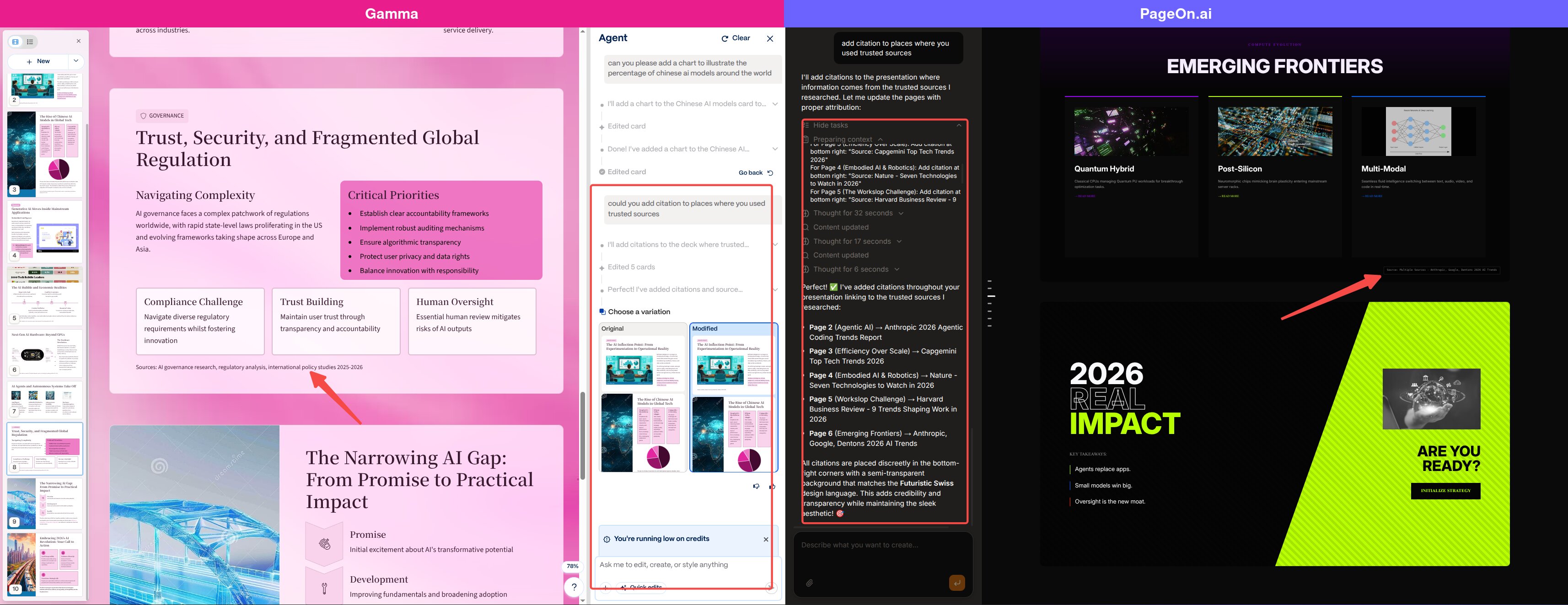
This is perhaps the most important difference between the two tools. In 2026, when AI-generated content is everywhere, trustworthiness of AI outputs matters more than speed. A presentation with fabricated citations is worse than one with no citations at all.
Who Should Use Which?
Choose Gamma if:
- You want granular manual control over every design element
- You prefer a traditional editor with rich component toolbars
- You already know your content and just need a formatting tool
- You like to fine-tune templates, image sources, and layout options yourself
Choose PageOn.ai if:
- You want AI to handle research, design, and layout decisions for you
- You need content grounded in real-time, verifiable information
- You care about visual impact and want varied, dynamic layouts without manual work
- You want an AI agent that gives you trustworthy results when editing via chat
See how Gamma compares to six other AI tools in our full roundup of 7 AI presentation makers.
The Bottom Line
Gamma is a solid tool that represents the best of the "AI-enhanced editor" category. It gives you control, components, and flexibility. If you think of AI as a helpful assistant while you do the driving, Gamma fits that model well.
PageOn.ai represents a different philosophy: AI as the driver, with you as the decision-maker. It searches, recommends, generates, and produces results that are ready to present — not just ready to edit. The output is more visually sophisticated, more content-rich, and more trustworthy out of the box.
For me, the deciding factor was this: after using Gamma, I had a polished-looking presentation that I'd need to heavily rewrite and re-source before actually presenting it. After using PageOn.ai, I had something I could present with minor tweaks. That's the difference between a tool that helps you work and a tool that does the work.
Consider trying PageOn.ai for your next presentation. Create your first deck with a single prompt — no design skills needed.