
Code to Flowchart: Transform Complex Logic into Visual Clarity
I've discovered that transforming code into visual flowcharts isn't just about pretty diagrams—it's about unlocking understanding. Let me share how modern AI-powered tools are revolutionizing the way we visualize and comprehend complex programming logic.
The Challenge of Understanding Code Structure

I've spent countless hours staring at complex codebases, trying to trace through nested loops and conditional statements. The growing complexity of modern software systems creates an intricate web of logic flows that can overwhelm even experienced developers. When I'm debugging an unfamiliar algorithm or trying to understand legacy code, traditional line-by-line reading often feels like navigating a maze blindfolded.
The communication gap becomes even more pronounced when I need to explain program behavior to non-technical stakeholders. I've watched eyes glaze over as I attempted to describe recursive functions or asynchronous operations using words alone. This is where the transformation from code to flowchart becomes invaluable—it's the universal language that bridges technical complexity and human understanding.
"Visual representations can reduce code comprehension time by up to 40%, transforming hours of confusion into moments of clarity."
The Power of Visual Code Representation
I've discovered that flowcharts serve as a bridge between abstract code and concrete understanding. When I transform a complex algorithm into a visual flow, suddenly the logic becomes tangible. The benefits I've experienced firsthand include faster debugging, dramatically improved documentation quality, and most importantly, enhanced team collaboration.
Impact of Visual Code Representation
The cognitive science behind this improvement fascinates me. Our brains process visual information 60,000 times faster than text. When I look at a flowchart, I'm not just reading sequential lines—I'm seeing the entire architecture at once, understanding relationships, identifying patterns, and spotting potential issues that would be invisible in raw code.
Traditional vs. Modern Code Visualization Approaches
Legacy Tools and Their Limitations
I remember the days of manually creating flowcharts in Visio, painstakingly dragging and dropping boxes, aligning arrows, and constantly updating diagrams whenever the code changed. Tools like FateSoft's Code Visual to Flowchart represented a step forward, supporting over 30 programming languages and offering automatic generation. However, these desktop-based solutions still limited collaboration and required significant time investment for maintenance.
AI-Powered Revolution in Code Visualization
The transformation I've witnessed with AI-powered tools is nothing short of revolutionary. Modern platforms offer instant conversion capabilities, transforming my code snippets into comprehensive flowcharts in seconds. Whether I'm working with Python, Java, C++, JavaScript, Rust, or PHP, these tools understand the syntax and structure, creating interactive visualizations that I can zoom, pan, and explore.
Traditional Approach
- • Manual diagram creation
- • Hours of tedious work
- • Static output formats
- • Limited collaboration
- • Constant manual updates
Modern AI Approach
- • Instant automatic generation
- • Seconds to create
- • Interactive visualizations
- • Real-time collaboration
- • Live synchronization
Breaking Down Complex Systems with PageOn.ai's Visual Approach
From Fuzzy Logic to Clear Visual Narratives
What I love about PageOn.ai's approach is how it lets me describe complex algorithms conversationally through its "Vibe Creation" feature. Instead of wrestling with diagram tools, I can simply explain what my code does in natural language, and watch as it transforms into structured visual stories. The platform helps me create layered visualizations that reveal different levels of code complexity, making it perfect for both quick overviews and deep dives.
Code to Flowchart Transformation Process
                    flowchart TD
                        A[Raw Code Input] --> B[AI Analysis]
                        B --> C{Language Detection}
                        C --> D[Parse Syntax]
                        C --> E[Identify Patterns]
                        D --> F[Generate Visual Elements]
                        E --> F
                        F --> G[Apply Flowchart Symbols]
                        G --> H[Create Interactive Diagram]
                        H --> I[Enable Collaboration]
                        style A fill:#FF8000,stroke:#333,stroke-width:2px,color:#fff
                        style H fill:#66BB6A,stroke:#333,stroke-width:2px,color:#fff
Building Modular Code Visualizations
PageOn.ai's AI Blocks feature has transformed how I create documentation. I can build LEGO-like visual components for functions and modules, combining code snippets, flowcharts, and explanatory text in unified presentations. The platform automatically applies proper flowchart symbols through AI recognition, ensuring my diagrams follow industry standards without manual effort.
For managing enormous flowchart complexity, I implement expand/collapse levels that let viewers drill down into specific areas of interest. This approach, combined with comprehensive flowchart examples, helps me build documentation that's both thorough and accessible.
Practical Applications Across Industries
Software Development and Debugging
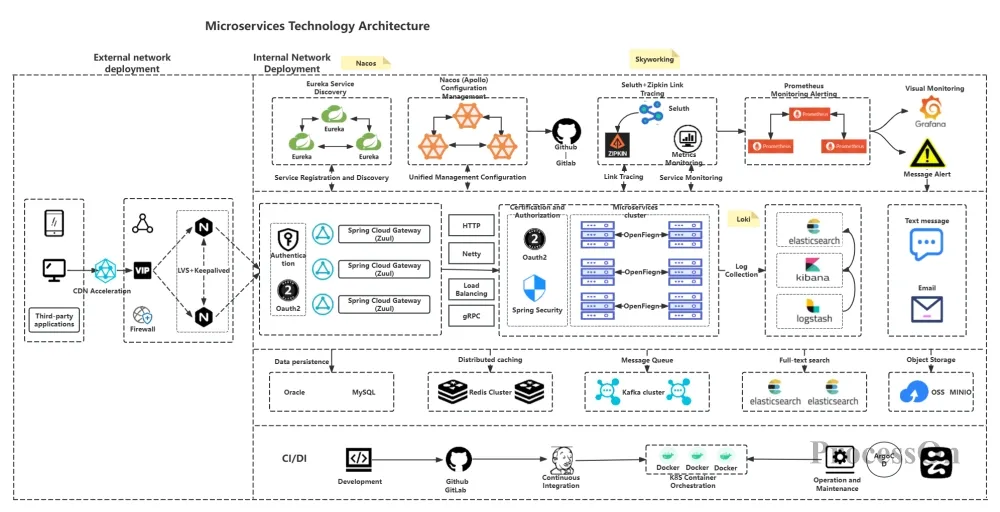
In my development work, I've found code-to-flowchart tools invaluable for visualizing asynchronous operations and promise chains in JavaScript. When debugging microservice architectures, I can map out API interactions and data flows visually, making it easier to identify bottlenecks and race conditions. I've also created MCP troubleshooting flowcharts for system diagnostics, which have become essential references for our operations team.
Education and Knowledge Transfer
Teaching programming concepts becomes remarkably easier with visual aids. I create step-by-step execution flowcharts that help beginners understand how loops iterate and conditions branch. For onboarding new team members, I've built comprehensive visual documentation that reduces ramp-up time from weeks to days. The ability to explain complex algorithms to non-technical stakeholders through clear diagrams has been a game-changer in project meetings.
Project Management and Communication
I've learned to translate technical requirements into visual specifications that everyone can understand. My visual progress reports show code architecture evolution over time, making it easy for managers to track development progress. These visual aids facilitate cross-functional team discussions and have become essential for documenting compliance and audit trails in regulated industries.
Application Areas Distribution
Advanced Features Transforming Code Analysis
Real-Time Synchronization and Interactivity
The real magic happens with live synchronization. As I modify my code, the flowchart updates automatically, maintaining perfect accuracy. The bidirectional navigation is particularly powerful—I can click on a flowchart element to highlight the corresponding code, or click on code to see where it appears in the flow. This interactive debugging with visual breakpoint representation has revolutionized how I trace through program execution.
Key Interactive Features:
- ✓ Live code-to-flowchart updates
- ✓ Bidirectional navigation
- ✓ Visual breakpoint debugging
- ✓ Real-time team collaboration
- ✓ Interactive zoom and pan
- ✓ Node expansion/collapse
Export and Integration Capabilities
The flexibility in export formats has been crucial for my workflow. I can generate PNG images for presentations, PDFs for documentation, or export directly to Word, Excel, and PowerPoint. The Markdown export is perfect for technical blogs and wikis. Integration with platforms like Confluence and Jira means my flowcharts live alongside other project documentation. The API access even allows me to automate flowchart generation in CI/CD pipelines, ensuring documentation stays current with every code commit.
Choosing the Right Code-to-Flowchart Solution
Key Evaluation Criteria
When I evaluate code-to-flowchart tools, I look for comprehensive language support and parsing accuracy. The visualization customization options and styling flexibility determine whether I can create diagrams that match our documentation standards. Collaboration features and team accessibility are non-negotiable for distributed teams. Integration with existing development workflows saves countless hours, and I carefully consider pricing models—many tools offer generous free tiers perfect for individual developers or small teams.
| Feature | Traditional Tools | Modern AI Solutions | PageOn.ai |
|---|---|---|---|
| Language Support | Limited | Extensive | Universal + Natural Language |
| Generation Speed | Hours | Seconds | Instant |
| Collaboration | File-based | Real-time | AI-Enhanced Team Work |
| Customization | Manual | Template-based | AI-Driven + Manual |
Leveraging PageOn.ai's Deep Search for Enhanced Visualizations
PageOn.ai's Deep Search capability has transformed how I create comprehensive visualizations. It automatically finds and integrates relevant code examples from repositories, pulling in related documentation and comments for context-rich flowcharts. By connecting with AI-powered flowchart tools, I can access advanced features that would typically require multiple specialized applications. This integration allows me to create comprehensive visual knowledge bases that combine multiple code sources into cohesive documentation.
Future of Code Visualization

The future I envision for code visualization is incredibly exciting. We're already seeing emerging trends in 3D code visualization and VR-based code exploration that will revolutionize how we interact with complex systems. AI-driven code explanation and automatic documentation generation are becoming more sophisticated, understanding not just syntax but intent and purpose.
Evolution of Code Visualization Technology
                    flowchart LR
                        A[Manual Flowcharting] --> B[Desktop Tools]
                        B --> C[Web-Based Platforms]
                        C --> D[AI-Powered Generation]
                        D --> E[3D/VR Visualization]
                        E --> F[Agentic Documentation]
                        style A fill:#9CA3AF,stroke:#333,stroke-width:2px
                        style D fill:#FF8000,stroke:#333,stroke-width:2px,color:#fff
                        style F fill:#10B981,stroke:#333,stroke-width:2px,color:#fff
Integration with IDE plugins is creating seamless development workflows where visualization happens alongside coding. The convergence of code visualization with no-code/low-code platforms is democratizing software development, making it accessible to a broader audience.
What excites me most is PageOn.ai's Agentic approach, which will transform intent into polished visual documentation automatically. Imagine describing what you want your code to do, and having not just the code generated, but comprehensive visual documentation created simultaneously. This is the future we're building toward—where the barrier between thought and implementation disappears entirely.
The Path Forward
As we move forward, code-to-flowchart technology isn't just about visualization—it's about fundamentally changing how we think about, communicate, and collaborate on software development. The tools available today are just the beginning of a transformation that will make code as easy to understand as reading a story, and as simple to share as sending a picture.
Transform Your Code into Visual Masterpieces with PageOn.ai
Ready to revolutionize how you visualize and document your code? PageOn.ai combines the power of AI with intuitive design tools to help you create stunning, interactive flowcharts that bring your code to life. Whether you're debugging complex algorithms, onboarding new team members, or presenting to stakeholders, PageOn.ai makes it effortless.
Start Creating with PageOn.ai TodayYou Might Also Like
Mastering Google Slides Transitions and Animations: The Complete Motion Panel Guide
Learn how to create smooth transitions and animations in Google Slides using the Motion panel. Master slide transitions, object animations, and advanced techniques for impactful presentations.
Mastering Animation Timing: Essential Techniques for Dynamic Presentation Slides
Learn essential animation timing techniques for creating dynamic presentation slides. Master entrance, exit, and transition timing for PowerPoint and Google Slides to enhance your visual storytelling.
Streamlining Presentation Preparation: Efficient Copy-Pasting Techniques & Smart Integration
Discover advanced copy-paste techniques and AI-powered alternatives to transform your presentation workflow. Learn how to save time and maintain consistency across slides.
Creating Immersive Worlds: The Art of Color and Atmosphere in Visual Storytelling
Discover how to build magical worlds using color psychology and atmospheric elements. Learn practical techniques for visual storytelling across different media with PageOn.ai's innovative tools.