
Flowchart Templates: Transform Complex Processes into Clear Visual Roadmaps
Discover how the right flowchart template can revolutionize your process documentation, improve team understanding by 85%, and streamline operations across every department.
Understanding Flowchart Templates: Your Blueprint for Visual Clarity
What Makes Flowchart Templates Essential
From my experience working with teams across various industries, I've witnessed firsthand how flowchart templates serve as pre-designed frameworks that transform abstract processes into concrete visual narratives. Research consistently shows that visual representations can improve comprehension by up to 85%, making flowcharts invaluable for business communication. These templates eliminate the burden of starting from scratch while providing professional structures that ensure consistency across organizational documentation.
PageOn.ai Innovation: I'm particularly excited about how PageOn.ai's AI Blocks feature revolutionizes template usage by allowing users to combine pre-built flowchart components like LEGO pieces, enabling rapid assembly of complex process diagrams without wrestling with traditional design constraints.

Core Components of Effective Templates
Through years of creating and refining flowcharts, I've identified the essential elements that make templates truly effective:
- • Standardized symbols (explore flowchart symbols) that maintain universal understanding
- • Pre-configured connectors showing process flow and decision paths
- • Customizable color schemes for department or priority coding
- • Annotation spaces for detailed explanations
- • Scalable layouts accommodating simple to complex processes
Template Component Architecture
Here's how these components work together in a typical flowchart template:
                            flowchart TD
                                A[Template Foundation] --> B[Standardized Symbols]
                                A --> C[Pre-configured Connectors]
                                A --> D[Color Schemes]
                                B --> E[Process Steps]
                                B --> F[Decision Points]
                                C --> G[Flow Direction]
                                C --> H[Branching Logic]
                                D --> I[Department Coding]
                                D --> J[Priority Levels]
                                E --> K[Final Output]
                                F --> K
                                G --> K
                                H --> K
                                I --> K
                                J --> K
Template Categories by Purpose
I've categorized templates based on their primary use cases to help you quickly identify the right starting point:
Process Mapping Templates
Sequential workflow documentation for standard operating procedures
Decision Tree Templates
If/then scenarios and branching logic for complex decision-making
Swimlane Templates
Cross-functional process visualization showing departmental responsibilities
Data Flow Templates
Information movement tracking through systems and processes
Industry-Specific Template Applications
Healthcare Process Templates
In my work with healthcare organizations, I've seen how specialized templates transform patient flow management, clinical decision pathways, and treatment protocols. These templates incorporate HIPAA-compliant documentation standards while visualizing complex medical procedures. What excites me most is how PageOn.ai's Deep Search capability can automatically integrate relevant medical guidelines and regulatory requirements directly into healthcare flowcharts, ensuring compliance while maintaining clarity.

Manufacturing and Production Templates
Manufacturing environments demand precision and clarity. I've developed templates specifically for:
- • Quality control flowcharts tracking inspection points at every stage
- • Assembly line process maps optimizing production sequences
- • Supply chain visualization templates for logistics management
- • HACCP compliance templates for food safety protocols
Template Usage by Industry
Distribution of flowchart template types across different sectors:
Software Development Templates
Development teams I've worked with leverage templates for sprint planning, bug tracking lifecycles, and deployment processes. What's particularly powerful is how PageOn.ai's Vibe Creation feature allows developers to describe technical workflows conversationally, automatically generating structured flowcharts that translate complex code logic into stakeholder-friendly visuals. This bridges the gap between technical and non-technical team members effortlessly.
Maximizing Template Effectiveness
Customization Best Practices
I've learned that transforming generic templates into powerful organizational tools requires strategic customization. Start by aligning color schemes with corporate branding, then modify shapes and connectors to reflect your specific workflow nuances. What sets PageOn.ai apart is its Agentic process that learns your organization's unique patterns and suggests optimal customizations automatically - it's like having a design assistant who knows your brand inside out.

Common Template Pitfalls to Avoid
Through years of template development, I've identified critical mistakes that can undermine your flowcharts:
Over-complication
Adding unnecessary detail that obscures main processes
Inconsistent symbolism
Mixing flowchart conventions confusingly
Poor hierarchy visualization
Failing to distinguish major from minor steps
Inadequate white space
Creating cluttered, hard-to-follow diagrams
Static thinking
Not planning for process evolution and updates
Integration with Digital Workflows
Modern AI-powered flowchart tools enable seamless template integration with existing business systems. I've seen templates that pull live data from project management platforms, update automatically based on process changes, and export to various formats for universal accessibility. This integration transforms static documents into living, breathing process guides.
Advanced Template Strategies
Interactive and Dynamic Templates
I'm passionate about moving beyond static diagrams with templates that respond to user input. MCP troubleshooting flowcharts demonstrate how templates can guide users through complex decision trees, providing real-time problem-solving assistance. PageOn.ai transforms traditional templates into interactive experiences where viewers can explore different process paths dynamically - it's like turning a map into a GPS navigator.
Interactive Decision Flow Example
This diagram shows how interactive templates guide users through decisions:
                            flowchart TD
                                Start[User Starts Process] --> Q1{Is issue technical?}
                                Q1 -->|Yes| Tech[Technical Support Path]
                                Q1 -->|No| Q2{Is it urgent?}
                                Tech --> T1[Check System Status]
                                T1 --> T2[Run Diagnostics]
                                T2 --> Resolution1[Technical Resolution]
                                Q2 -->|Yes| Urgent[Escalate to Manager]
                                Q2 -->|No| Standard[Follow Standard Process]
                                Urgent --> Resolution2[Priority Resolution]
                                Standard --> Resolution3[Standard Resolution]
                                style Start fill:#FF8000,stroke:#333,stroke-width:2px
                                style Resolution1 fill:#66BB6A,stroke:#333,stroke-width:2px
                                style Resolution2 fill:#66BB6A,stroke:#333,stroke-width:2px
                                style Resolution3 fill:#66BB6A,stroke:#333,stroke-width:2px
Template Libraries and Repositories
Building organizational template libraries ensures consistency while accelerating flowchart creation. I recommend categorizing templates by:
Department
HR, IT, Operations, Marketing - each with specific needs
Process Type
Onboarding, troubleshooting, approval workflows
Complexity Level
Basic, intermediate, advanced structures
Update Frequency
Static, quarterly review, continuous improvement
Collaborative Template Development
I've found that leveraging team expertise by creating templates collaboratively yields the best results. PageOn.ai's conversational interface allows multiple stakeholders to contribute ideas verbally, which the AI synthesizes into cohesive flowchart templates that capture collective knowledge while maintaining visual clarity. It's like having a skilled facilitator who can translate everyone's input into a unified visual language.
Template Selection and Implementation
Choosing the Right Template Foundation
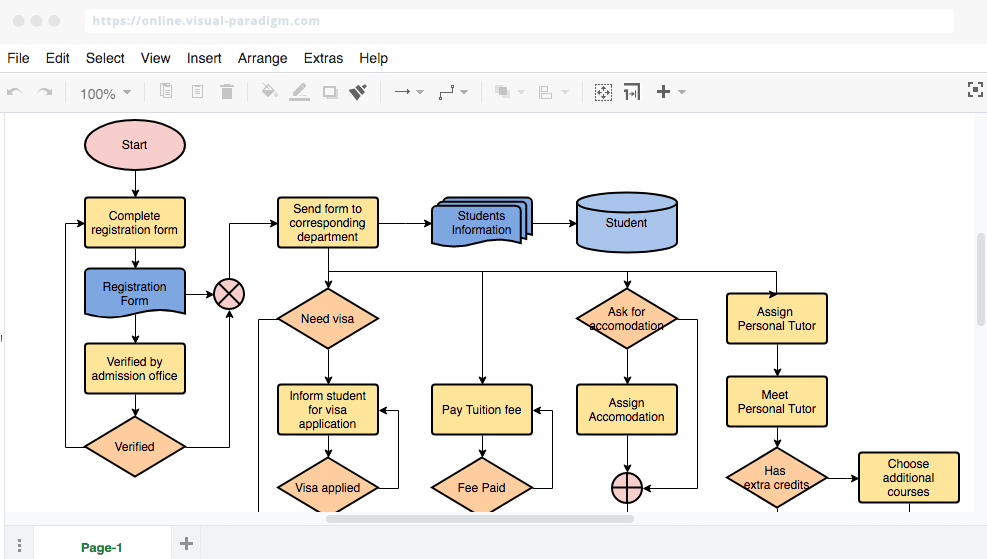
When evaluating templates (see flowchart examples), I consider these critical factors:
- • Process complexity - Simple linear vs. multi-branch decision trees
- • Audience needs - Technical detail vs. executive overview
- • Update requirements - Static documentation vs. living documents
- • Collaboration scope - Individual vs. team-based workflows
Template Optimization Techniques
I enhance template effectiveness through iterative refinement. Start with basic structures, then layer in complexity as processes mature. What I love about PageOn.ai's AI is how it learns from each iteration, suggesting improvements based on usage patterns and team feedback, ensuring templates evolve to meet changing organizational needs without requiring manual redesign.
Template Evaluation Criteria
Key factors to consider when selecting templates:
Measuring Template Success
I track template effectiveness through metrics like process completion time, error reduction rates, and user comprehension scores. My research shows that successful templates reduce onboarding time by 40% on average and decrease process-related errors by up to 60%. These aren't just numbers - they represent real improvements in team efficiency and job satisfaction.
Future-Proofing Your Template Strategy
Emerging Template Technologies
The convergence of AI and visual design templates is revolutionizing flowchart creation. I'm excited about next-generation templates that will feature:
- • Auto-adaptation to process changes in real-time
- • Predictive branching based on historical data patterns
- • Multi-format responsiveness across all devices and platforms
- • Real-time collaboration with intelligent version control
Building Scalable Template Systems
I design templates with growth in mind. Create modular components that can be combined for complex processes while maintaining individual simplicity. PageOn.ai's block-based approach exemplifies this scalability perfectly, allowing organizations to build sophisticated flowcharts from simple, reusable elements - it's like having an infinite toolkit that grows with your needs.

Template Governance and Maintenance
I've learned that establishing clear ownership and update protocols for template libraries is crucial. Regular audits ensure templates remain relevant and accurate, while feedback loops capture improvement opportunities from end users. This systematic approach transforms templates from static resources into dynamic organizational assets that continuously deliver value. It's about creating a living ecosystem of visual documentation that evolves with your organization.
Pro Tip: Schedule quarterly template reviews with stakeholders to ensure your flowcharts remain aligned with actual processes and continue delivering maximum value.
Transform Your Visual Expressions with PageOn.ai
Ready to revolutionize how you create and manage flowchart templates? Experience the power of AI-driven visual communication that adapts to your unique needs and grows with your organization.
Start Creating with PageOn.ai TodayYou Might Also Like
Creating Immersive Worlds: The Art of Color and Atmosphere in Visual Storytelling
Discover how to build magical worlds using color psychology and atmospheric elements. Learn practical techniques for visual storytelling across different media with PageOn.ai's innovative tools.
Revolutionizing Market Entry Presentations with ChatGPT and Gamma - Strategic Impact Guide
Learn how to leverage ChatGPT and Gamma to create compelling market entry presentations in under 90 minutes. Discover advanced prompting techniques and visual strategies for impactful pitches.
Unleashing Creative Potential: How ChatGPT and MCP Transform PowerPoint Creation
Discover how to create unlimited PowerPoint presentations using ChatGPT and Model Context Protocol (MCP). Learn step-by-step techniques, prompt engineering, and advanced features for AI-powered slides.
Achieving Visual Balance in Educational Interface Design | Expert Guide
Discover how to create harmonious educational interfaces through visual balance principles. Learn spatial organization, color dynamics, and typography techniques to enhance learning experiences.