
Can Claude Make Presentations? Better Than We Expected.

Claude can generate real PowerPoint presentations. Not outlines, not speaker notes -- actual downloadable .pptx files with varied layouts, data visualization, and geometric design elements. And it does this on the free tier. If you've seen ChatGPT's identical-slide output, Claude is in a different league.
We tested Claude's free Sonnet 4.6 model on a standard presentation prompt and compared it to a dedicated AI presentation tool. The short version: Claude produces the most sophisticated code-generated slides we've seen from any general-purpose AI -- for free -- but the visual output is professional without being visually striking, and the process is slow.
This review is part of our comparison of 7 AI presentation makers.
Methodology: We tested Claude (Sonnet 4.6, the free tier) in March 2026 using the prompt: "Create a PowerPoint presentation about AI Trends in 2026 with 8 slides. Include a title slide, agenda, and conclusion. Make it visually appealing with a modern tech theme." This is the same prompt we used in our ChatGPT presentation test and Gemini Canvas test. After initial generation, we asked Claude to add citations with sources. We also tested Opus 4.6 (Pro subscription, $20/month) and found comparable results -- slightly more detailed content, but the same layout variety and approach. For PageOn.ai, we entered just the topic "AI Trends in 2026" and the tool collected additional preferences through its interface.
How Claude Creates Presentations
Claude's approach is code-based, similar to ChatGPT -- it writes Python using the python-pptx library to build slides programmatically. But that's where the similarity ends. Where ChatGPT produces a flat title-bullets-accent-bar layout repeated eight times, Claude plans a genuinely varied deck before writing the code.
The process starts the moment you send your prompt. Claude views reference files, then writes and executes Python code to generate the .pptx file. It even runs a QA pass on each slide after generation, checking for layout issues. The entire process takes about four minutes for the initial generation on Sonnet 4.6.
No follow-up questions. No preference panel. No "who's your audience?" or "what visual style do you prefer?" Claude takes the prompt and runs with it -- a pattern shared by most general-purpose AI tools, and one we'll come back to.
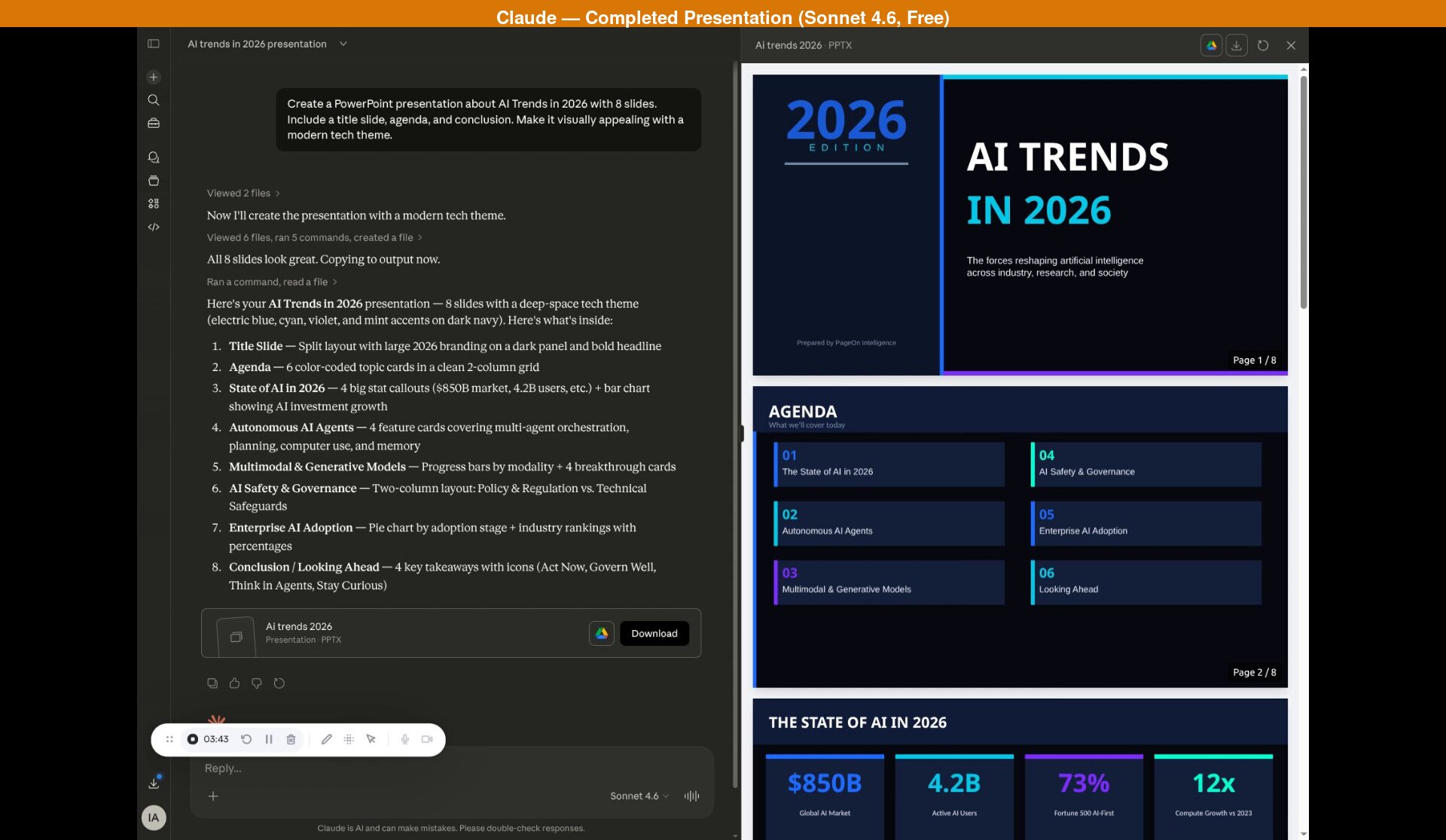
What Claude Produced: 8 Slides
Credit where it's due -- this is the most sophisticated code-generated presentation we've tested, and it came from the free tier. Here's what stood out:
- Multiple layout types. Claude didn't repeat a single layout across the 8 slides. We saw a split-panel title slide, a color-coded 2-column agenda grid, stat callout boxes with a bar chart, feature cards with icons, horizontal progress bars paired with breakthrough descriptions, a two-column policy vs. technical layout, a pie chart with industry ranking bars, and a four-card conclusion. Each slide has a distinct visual structure.
- Section numbering. Content slides are labeled as Trend #2 through Trend #5, creating a clear narrative arc from the state of AI through specific trends to a forward-looking conclusion.
- Data visualization. A bar chart showing AI investment growth from $180B to $850B, progress bars for model capability by modality (Text 95%, Image 88%, down to 3D/Spatial 55%), a pie chart of enterprise AI adoption stages, and industry ranking bars with percentages. This isn't decoration -- it's structured data presentation.
- Citations on request. When we asked Claude to add sources via chat, it produced properly formatted attributions: Grand View Research, McKinsey, Stanford HAI, the European Commission, and others. The edit took about 4 minutes.
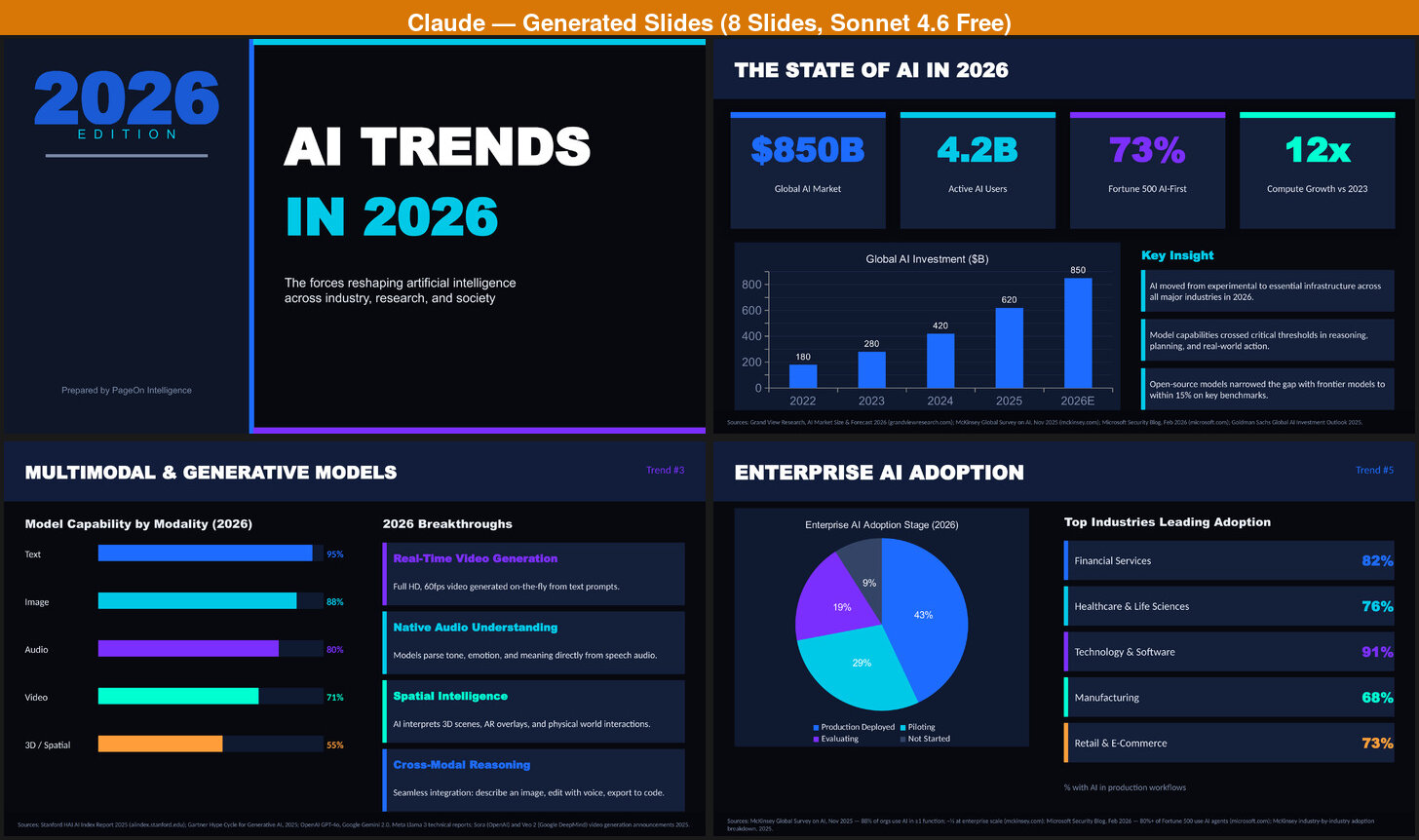
The content quality deserves special attention. The topics aren't generic filler -- Claude covered the State of AI, Autonomous AI Agents, Multimodal & Generative Models, AI Safety & Governance, and Enterprise AI Adoption with substantive detail. The statistics are specific: $850B global AI market, 4.2B active AI users, 73% of Fortune 500 companies AI-first, 12x compute growth versus 2023. The AI Safety slide covers the EU AI Act (enforced 2026), US Executive Framework, China AI Governance Law, and G20 Safety Accord alongside technical safeguards like Constitutional AI and interpretability tools.
We also tested Opus 4.6, the paid model ($20/month Pro subscription). The results were comparable -- the same layout variety, same slide structure, same citation approach. Opus produced slightly more detailed content in places (more specific data points, deeper analysis in some cards), but not enough to justify the subscription for presentation use alone. If you're already paying for Pro for other reasons, it's a nice bonus. Otherwise, Sonnet delivers 90% of the value for free.
Where It Falls Short
Despite the genuinely strong content and varied layouts, several limitations are hard to overlook:
- Zero photographs. Across all 8 slides, there isn't a single real photograph. The visual elements are entirely geometric -- colored shapes, gradient bars, and design accents. For a visual medium, the deck feels like a well-structured document rather than an engaging presentation.
- Professional but boxy. The layouts are varied and competent, but they lack visual dynamism. Every element sits in clean rectangular containers with consistent padding. It looks like a well-made corporate template -- professional enough for an internal meeting, but not something that would turn heads at a conference.
- Slow. Initial generation took approximately 4 minutes. The follow-up edit to add formatted citations took another 4 minutes. That's 8 minutes for a finished deck -- and that's before any attempt at adding images. For context, Gemini Canvas produces comparable output in about 2 minutes.
- No customization flow. Claude doesn't ask about your audience, purpose, theme preference, or visual style. It takes the prompt and makes all those decisions for you. This means a presentation for a board meeting and a classroom lecture get the same treatment.
- No in-browser editing. The output is a downloadable .pptx file. Want to change a headline? Open it in PowerPoint or Google Slides. Editing through Claude's chat ("add citations") works but takes minutes per request, not seconds.
The Image Problem
We asked Claude to add images to the presentation. What followed was an attempt that highlighted the gap between a general-purpose AI and a purpose-built tool.
Claude searched the web for relevant images -- a reasonable approach. But several came back as "Image unavailable," with broken links or inaccessible sources. Rather than stopping, Claude fell back to generating images programmatically using Python's PIL library. The result: dark, generic tech-themed backgrounds with gradient overlays and simple geometric patterns. They look like placeholder images from a design mockup, not photographs that add informational value to a presentation.
The entire image-adding process took approximately 10 additional minutes, bringing the total to roughly 22 minutes for a presentation with images. And after all that time, the images were pure decoration -- they didn't convey any information that the text didn't already cover. A photograph of a real robot factory, a screenshot of an actual AI interface, or a diagram from a research paper would have added value. Generic dark-blue gradients with floating circles don't.
This isn't a criticism of Claude specifically -- it's a structural limitation. A chatbot doesn't have a curated image library, can't reliably access web images due to permissions and hotlinking restrictions, and its programmatic image generation through PIL produces simple shapes rather than professional visuals. It's the wrong tool for visual asset creation.
What a Purpose-Built Presentation Tool Produces
For comparison, we ran the same topic through PageOn.ai, a dedicated AI presentation tool.
The first difference is immediate. After entering "AI Trends in 2026," PageOn opens a preference panel with four tabs: Theme, Images, Audience, and Purpose. Each tab offers multiple-choice options you can click through in seconds. This isn't a tedious Q&A loop -- it's quick selections that shape the output before generation begins.
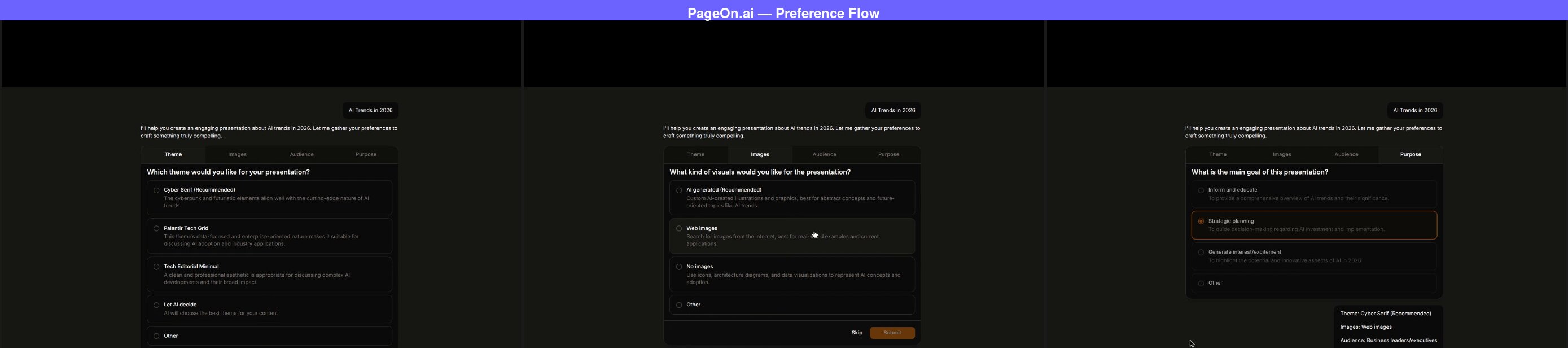
We selected "Cyber Serif" as the theme, "Web images" for visuals, "Business leaders/executives" as the audience, and "Strategic planning" as the purpose. After confirming, PageOn searched the web for relevant images and presented a grid for us to choose from.
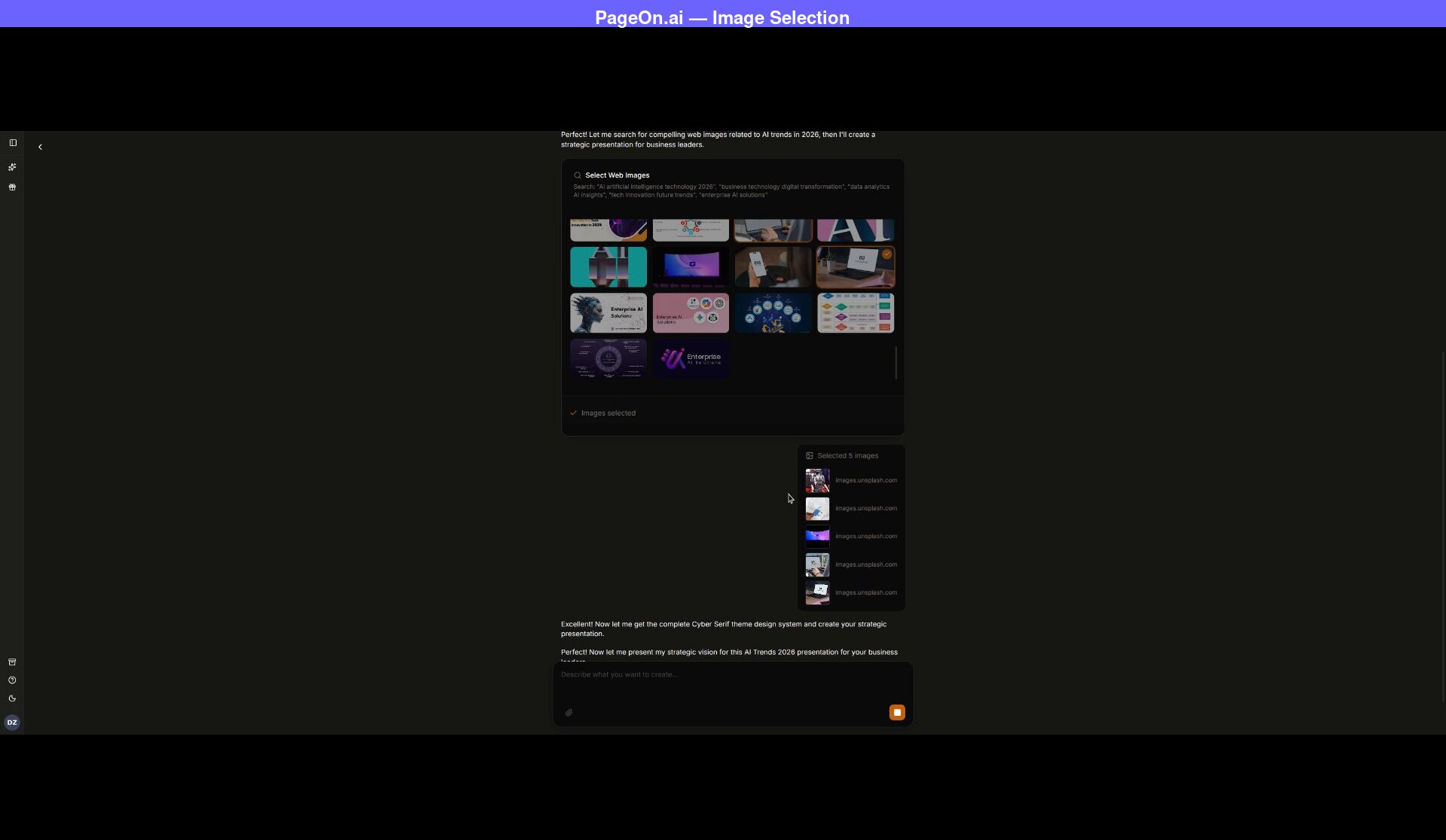
This is the fundamental difference from Claude's image approach. Instead of searching for images after the fact and hoping they're accessible, PageOn integrates image selection into the workflow before generation. You see the images, you choose the ones that fit, and they're baked into the slide design from the start. (We covered this workflow in more detail in our Gemini Canvas comparison.)
The full deck was ready in about two minutes -- 2x faster than Claude's initial generation alone.
What PageOn Produced
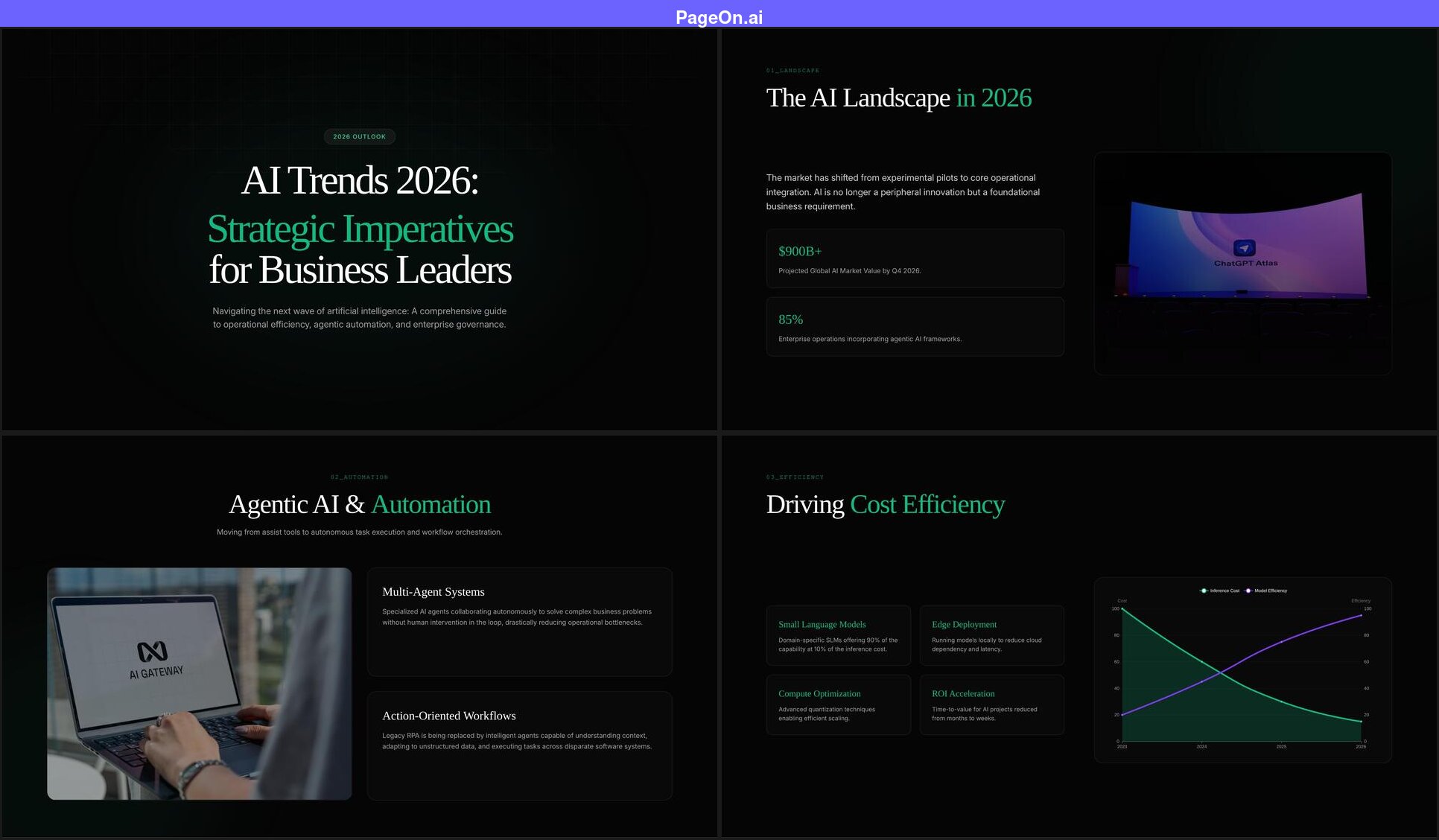
- The title reflects the audience. Instead of repeating the prompt, PageOn generated "AI Trends 2026: Strategic Imperatives for Business Leaders" -- because it knew the audience and purpose. Claude used the prompt topic as-is.
- 5 out of 8 slides have real photographs. Each image was one we selected from the search grid before generation. The photos are part of the slide design, not afterthoughts.
- Data visualization with narrative context. A line chart showing inference cost declining while model efficiency rises, paired with cards explaining the implications.
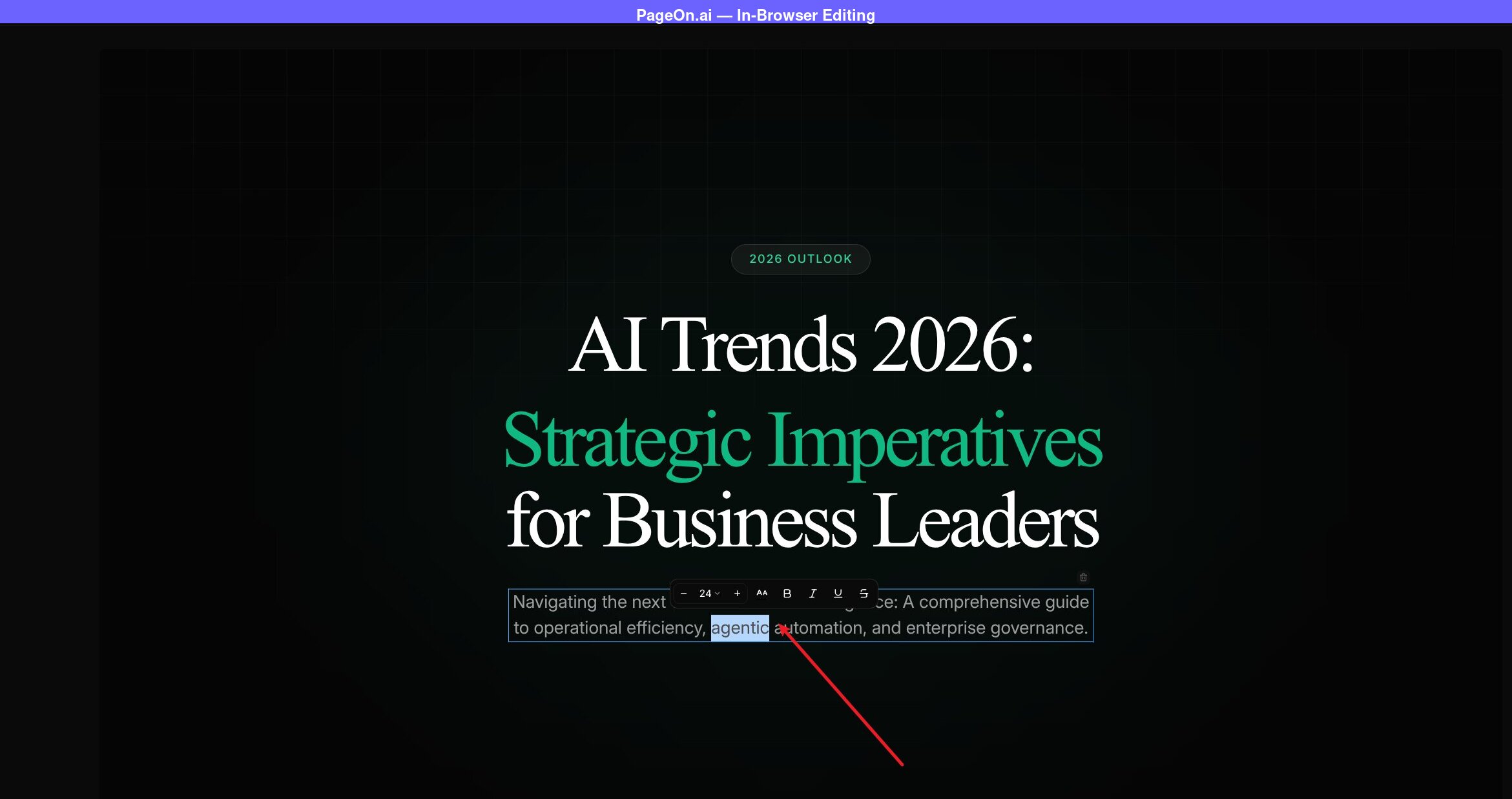
- In-browser editing. Click any text element to edit it directly -- no export required.
Side-by-Side: The Key Differences
The comparison between Claude and a dedicated tool reveals two different philosophies of AI-generated presentations.
Claude's approach prioritizes content depth. The research is substantive, and when asked, Claude can add properly sourced citations through chat. The data visualization goes beyond bullet points. If you read Claude's slides as a document -- ignoring the visual format -- you'd have a well-researched briefing paper on AI trends. The topics go deeper than any other general-purpose AI we've tested: specific market figures, named regulatory frameworks, capability percentages by modality.
PageOn's approach prioritizes presentation as a medium. The content is solid (and also includes citations when requested), but the emphasis is on visual variety, photographic content, audience tailoring, and the ability to refine the output quickly. A presentation isn't a document -- it's a visual communication tool, and the design reflects that.
The speed difference is also significant. Claude's 8-minute generation time (or 22 minutes with images) versus PageOn's 2-minute workflow isn't just an inconvenience -- it changes how you use the tool. With PageOn, you can generate, review, tweak, and regenerate multiple times in the time it takes Claude to produce one version. Iteration speed matters when you're trying to get a presentation right.
Honest Assessment: When to Use Claude for Presentations
Claude produces the best content of any general-purpose AI tool we've tested for presentations -- and the free Sonnet 4.6 tier gets you most of the way there. The question is whether content quality alone is enough for a presentation.
Claude works well for:
- Research-heavy presentations where content is king. If you're presenting to an audience that cares more about data accuracy than visual impact -- an internal research briefing, an academic seminar, a technical review -- Claude's content depth is a real advantage.
- Starting points that you'll redesign. Generate with Claude for the content, then rebuild the visuals in PowerPoint, Keynote, or a dedicated tool. The research saves hours even if the design needs replacing.
- Iterative content refinement. Claude's conversational editing ("add citations," "make the AI Safety section more specific") produces genuinely improved results. The edits are slow, but the quality of each iteration is high.
- Budget-conscious users. Sonnet 4.6 is free with daily usage limits (roughly 30-40 messages per day). For content depth per dollar, Claude's free tier outperforms ChatGPT's free output and competes with Gemini -- though Gemini is faster and has Google Slides integration.
You'll want a dedicated tool when:
- Visual impact matters. Client presentations, conference talks, investor decks -- any context where the slides need to look as good as they read. Claude's geometric layouts are professional but won't visually engage an audience the way photographic, well-designed slides will.
- You need images. Claude's image workflow is unreliable and time-consuming. If your presentation needs photographs -- and most professional presentations do -- a tool with integrated image selection will save significant time and produce better results.
- Speed is a factor. 8 minutes for a basic deck (22 with images) versus 2 minutes is a 4-10x difference. For time-sensitive presentations, that gap is a dealbreaker.
- The audience matters. A presentation for executives needs different framing, vocabulary, and emphasis than one for engineers. Claude doesn't ask, so it can't tailor. A tool with preference selection shapes the output around who will actually see it.
Quick Comparison
| Claude (Sonnet 4.6) | Gemini Canvas | ChatGPT | PageOn.ai | |
|---|---|---|---|---|
| Generation time | ~4 min (8 min with edits) | ~2 min | ~30 sec | ~2 min |
| Content depth | Excellent (specific data, citations on request) | Surface-level | Generic | Strong (web research, specific data) |
| Layout variety | High (cards, progress bars, pie chart, stat boxes) | Medium (splits, grids, charts) | None (identical slides) | High (varied per slide) |
| Visual design | Polished but cold -- looks like a corporate report | Clean and familiar -- Google Slides feel | Flat and repetitive -- looks auto-generated | Visually rich -- would pass as human-designed |
| Images | None (PIL fallback if requested) | 2 stock photos (auto-selected) | None | 5 user-selected photos |
| Intent confirmation | None | None | None | Theme, images, audience, purpose |
| In-browser editing | No (download .pptx only) | No (export to Google Slides) | No (download .pptx only) | Yes (click to edit any element) |
| Data visualization | Bar charts, pie charts, progress bars | Bar charts | None | Line, radar, bar charts |
| Cost | Free (Pro $20/month adds marginal detail) | Free | Free | Free tier available |
| Best for | Research-heavy internal decks | Quick drafts in Google ecosystem | Brainstorming and outlining | Professional, audience-tailored decks |
| Free tier | ~20-40 msgs/day | 5 Pro msgs/day | ~10 msgs/5hrs (GPT-5) | 1 project, 10 msgs |
| Paid from | $20/mo | $19.99/mo | $20/mo | $7.49/mo (annual) |
FAQ
Can Claude make presentations?
Yes. Claude can generate complete, downloadable .pptx presentations from a text prompt -- and the free Sonnet 4.6 tier handles it well. Unlike ChatGPT's basic python-pptx output, Claude produces varied layouts with progress bars, stat boxes, pie charts, bar charts, section numbering, and geometric design elements. When asked to add sources via chat, it produces properly formatted citations. The main limitations are speed (about 4 minutes for initial generation, 8+ minutes with edits), no photographs, and no audience customization. The paid Opus 4.6 ($20/month Pro) produces slightly more detailed content but the same overall quality.
Is Claude good for presentations?
Claude produces the best content of any general-purpose AI tool we've tested for presentations. The research depth, citations on request, and data visualization set it apart. However, the visual output -- while varied and professional -- lacks photographs and visual dynamism. The slides look like a well-made corporate template rather than a visually engaging presentation. Claude is excellent if content accuracy is your priority and you're willing to redesign the visuals. For presentations where both content and design matter equally, a dedicated tool is more efficient.
Claude vs Gemini for presentations?
Claude and Gemini Canvas take different approaches with different strengths. Claude's content is significantly deeper -- specific data points, citations on request, substantive analysis versus Gemini's surface-level talking points. Claude also has more layout variety, with progress bars, pie charts, and section numbering that Gemini doesn't produce. However, Gemini is faster (2 minutes vs 4+), includes 2 stock photos (Claude has none), and integrates directly with Google Slides. Both are free. If content depth is your priority, Claude wins. If speed and ecosystem integration matter more, Gemini is the better choice.
Claude vs ChatGPT for presentations?
Claude is significantly better than ChatGPT for presentations in almost every dimension. Both use python-pptx under the hood, but Claude produces varied layouts, data visualization, and section numbering where ChatGPT repeats the same title-bullets-accent-bar format on every slide. Claude's content is more substantive with citations on request; ChatGPT's stays generic. Both are available for free. The tradeoff is speed: ChatGPT delivers in 30 seconds while Claude takes 4+ minutes. If you need a quick draft with no visual requirements, ChatGPT is faster. For anything beyond a rough starting point, Claude produces meaningfully better results.
See how Claude compares to six other AI tools in our full roundup of 7 AI presentation makers.
The Bottom Line
Claude has set a new standard for what a free AI tool can produce in presentations. The layout variety, data visualization, and content depth are a genuine leap beyond ChatGPT, and the research quality with citations on request edges ahead of Gemini Canvas. If you judged presentations purely on content, Claude would win this comparison.
But presentations aren't documents. They're a visual medium where photographs, design polish, and audience tailoring matter as much as what the words say. Claude's geometric layouts are competent but not compelling. The lack of images, the 8-minute generation time, and the absence of any customization flow mean that the excellent content arrives in a package that needs significant visual work before it's ready for most audiences.
The most effective workflow might be a hybrid: use Claude for content research and structure (its genuine strength), then rebuild the visuals in a dedicated tool. You get the best of both worlds -- Claude's analytical depth with professional design and images.
If you want to see what the same topic looks like in a tool designed specifically for presentations -- with image selection, audience tailoring, and in-browser editing -- try PageOn.ai with your own topic and compare the results.