
Best AI Presentation Makers in 2026: Same Prompt, Honest Results

We gave seven AI tools the same prompt and compared what came out. No cherry-picking, no manual tweaks, no premium tiers — just a topic ("AI Trends in 2026"), default settings, and the results each tool produced on its own. Here's what we found.
Our Verdict
There's no single "best" — but some tools clearly lead in specific dimensions:
- Best visual output: PageOn — unique layout on every slide, no recycled templates. The only output that looked designed, not generated
- Best content: Claude, Manus, and PageOn all do web research with specific data. Claude is the most data-dense but reads like a report; Manus goes deepest but buries it in text cards; PageOn turns the research into presentable slides — data becomes charts, context becomes visuals, not just text
- Best AI editing: Claude for complex reasoning (~4 min per edit). PageOn scales with the task: 10-20s simple edits, 2-3 min complex
- Best control: PageOn — AI-curated options that adapt to your input, plus an outline review before generation. Every other tool skips this or offers static menus
- Fastest to a polished deck: Gamma — first slide in 10 seconds, full 10-slide deck in about a minute with clean design
- Best free option for presentations: Gamma — 400 credits (~10 full decks) with polished output and a rich manual editor
- Best manual editor: Gamma and Canva — Gamma has the richer component toolbar, Canva has the larger design ecosystem
- Best ecosystem integration: Gemini (one-click Google Slides) and Canva (full design platform with brand kits, animations, templates)
The biggest gap isn't between any two tools — it's between tools that generate text formatted as slides and tools that generate actual presentations. Claude and Manus produce the most substantive content, but both need significant visual rework before you'd present them. If you want something you can present with minimal tweaks, the dedicated presentation tools are in a different category.
Full Comparison
Here's how all seven tools performed side by side — same prompt, same topic, default settings across the board.
| Gamma | Canva AI | ChatGPT | Gemini | Claude | Manus | PageOn | |
|---|---|---|---|---|---|---|---|
| Output | Online deck | Online deck | .pptx download | Canvas → Slides | .pptx download | Online deck | Online deck |
| Slides | 10 | 15 | 8 | 9 | 8 | 11 | 7-8 |
| First slide visible | ~10s | ~30s | ~30s | ~3 min | ~4 min | ~2 min | ~10s |
| Total generation | ~1 min | ~30s | ~30s | ~3 min | ~4 min | 10+ min | ~2-3 min |
| Streaming | Yes | No | No | No | No | Yes | Yes |
| Layout variety | 3 patterns recycled | 1 pattern (13/15) | 1 pattern (all) | Each slide different | Each slide different | Heavy repetition | Each slide different |
| Images | Stock, watermarked | AI-generated, decorative | None | 2 photos, low quality | None (geometric) | None | 5+ user-selected photos |
| Data charts | None | None | None | 1 bar chart | Bar, pie, progress bars | 1 bar chart | Line, radar, bar |
| Content depth | Surface-level | Generic filler | Structured, no sources | Surface-level | Structured, specific data | Web-researched, specific data | Web-researched, specific data |
| Web search | No | No | No | No | Yes | Yes | Yes |
| In-browser editing | Yes (rich editor) | Yes (Canva Editor) | No (.pptx only) | No (export first) | No (.pptx only) | Yes (after generation) | Yes |
| AI chat editing | Fast, but fabricates (made up citations) | Regenerates entirely instead of editing | Regenerates full .pptx each time | No AI editing (export to Google Slides) | Smart, ~4 min per edit | Smart, ~7-8 min per edit | 10-20s simple edits, 2-3 min complex |
| Pre-generation setup | Fixed options (text amount, theme, image source) + outline | Fixed style/audience menus | None | None | None | None | Adaptive — AI-curated options with smart recommendations |
| Free tier | 400 credits (~10 decks), no refresh | ~50 AI uses total | ~10 msgs/5hrs (GPT-5) | 5 Pro msgs/day | ~20-40 msgs/day | 1,000 + 300/day credits | 1 project, 10 msgs |
| Paid from | $8/mo | $15/mo | $20/mo | $19.99/mo | $20/mo | $20/mo | $7.49/mo (annual) |
Below is what we found when we tested each tool in detail.
Gamma
Fastest output with a polished manual editor, but recycled layouts and watermarked stock photos.
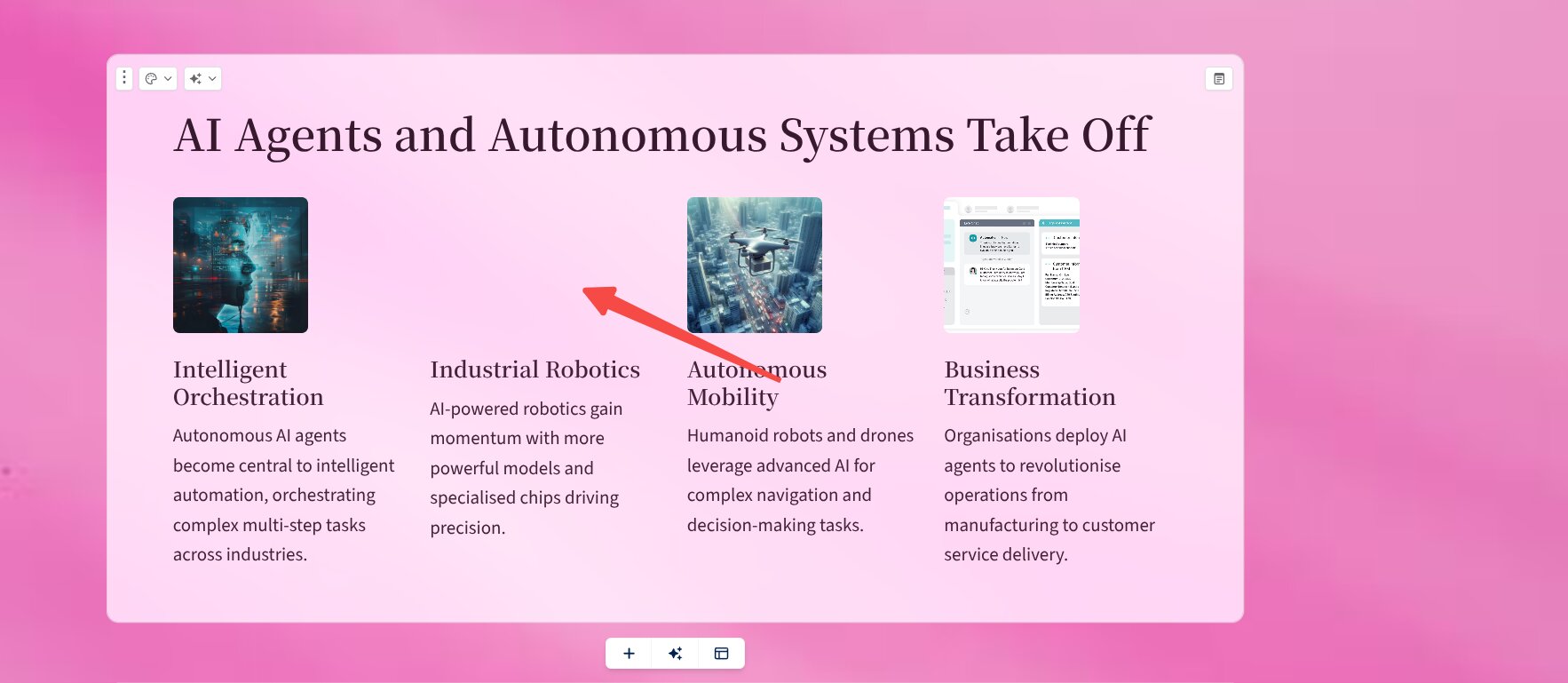
Gamma is the fastest tool we tested. You see the first slide within 10 seconds, and the full 10-slide deck streams in under a minute. The initial impression is polished — a clean pink-and-white color scheme with professional typography.
The problems show up when you look closer. Three layout patterns get recycled across all 10 slides: left-image-right-text, title-with-card-grid, and full-width-header. By slide 5, you've seen everything the design system has to offer. Stock photos from Dreamstime and Alamy appear on nearly every slide with visible watermarks, and some images are missing entirely.
Content depth is the bigger issue. Each of the 8 topics gets 2-3 sentences of surface-level commentary with no specific data, no benchmark numbers, and no sources. When we asked Gamma's AI chat to add citations, it responded quickly and claimed the task was done — but the citations were fabricated. They looked plausible but didn't link to real sources.
Where Gamma genuinely excels is its manual editor. The component toolbar is rich and intuitive, with interactive buttons, embedded apps, and pixel-level control. If you plan to use AI for a rough draft and then heavily redesign by hand, Gamma's editing experience is the best in this lineup.
Canva AI
Four design variations and a powerful manual editor, but near-identical layouts across all slides and AI editing that regenerates instead of modifying.
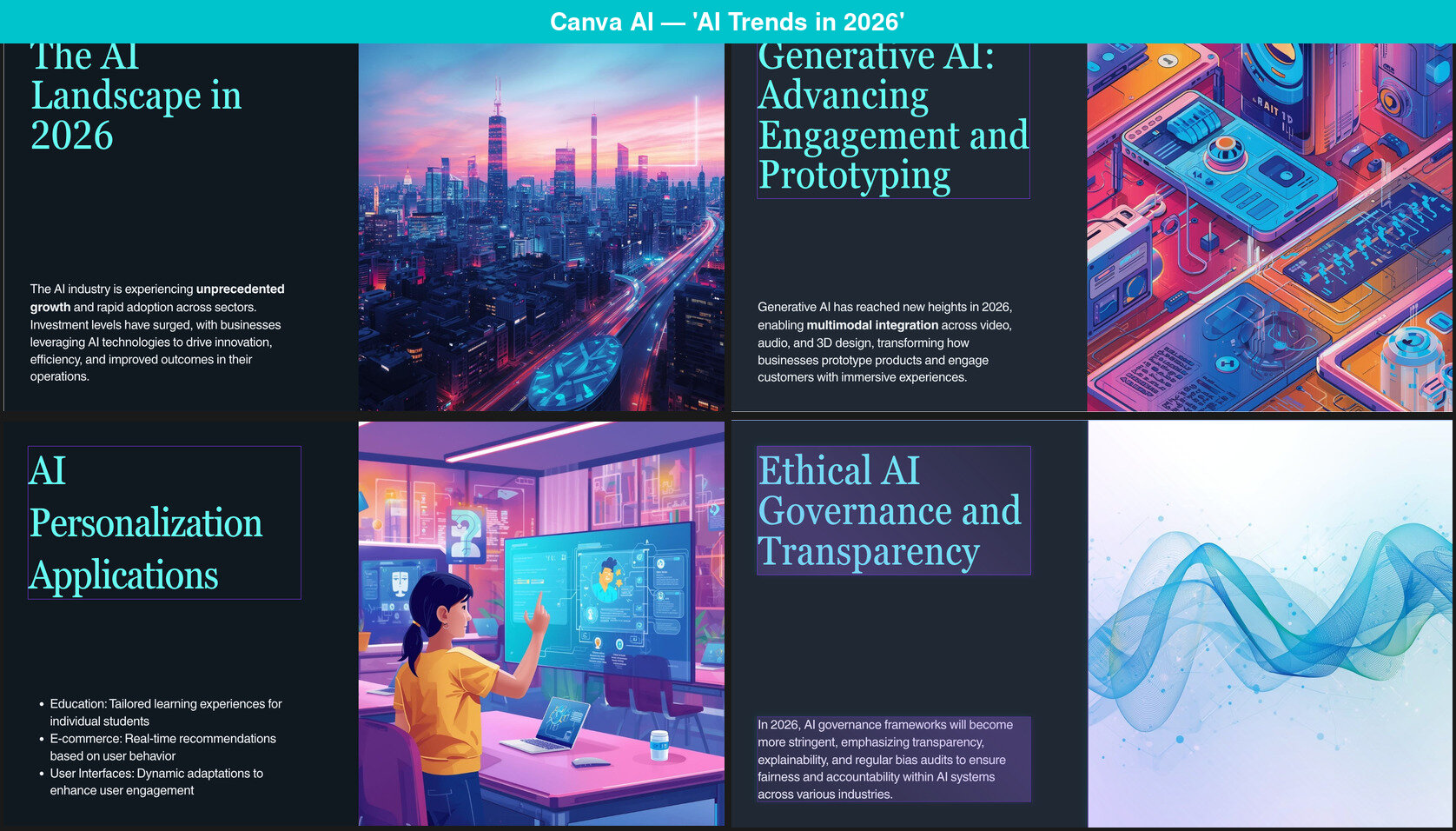
Canva AI generates four design variations to choose from — a feature unique to Canva in this comparison. The settings are thoughtfully designed, with 7 style themes and 3 audience types. Once you pick your options, the slides appear in about 30 seconds.
The output looks professional in isolation. Dark theme, cyan accents, clean typography, AI-generated images with no watermarks. But scroll through the 15-slide deck and a pattern emerges: 13 of the 15 slides use the exact same layout — large title on the left, paragraph text below, full-height image on the right. No data charts, no comparison tables, no timelines. The two remaining slides use a title-plus-gallery format.
The images are decorative rather than informational — the "Generative AI" slide shows an isometric illustration of random electronic devices, and the "Conversational AI" slide uses the robot-meets-human composition that was already a cliche in 2020. Content is generic filler: claims like "Over 60% of AI models are now deployed on devices" sound specific but are unsourced and unverifiable.
The most significant limitation is AI editing. When we asked Canva AI's chat to "add charts," it generated three entirely new presentations from scratch instead of modifying the existing one — none of which contained a single chart. Canva AI's "editing" through chat is actually regeneration.
Canva's strength is what surrounds the AI: the Canva Editor itself, with drag-and-drop design, brand kits, animations, and a massive template library. If you see AI as "generate a starting point, then do the real work manually," Canva is a solid choice.
Read our full Canva AI review →
ChatGPT
Fastest complete file — 30 seconds to a downloadable .pptx — but every slide looks the same with no images or charts.
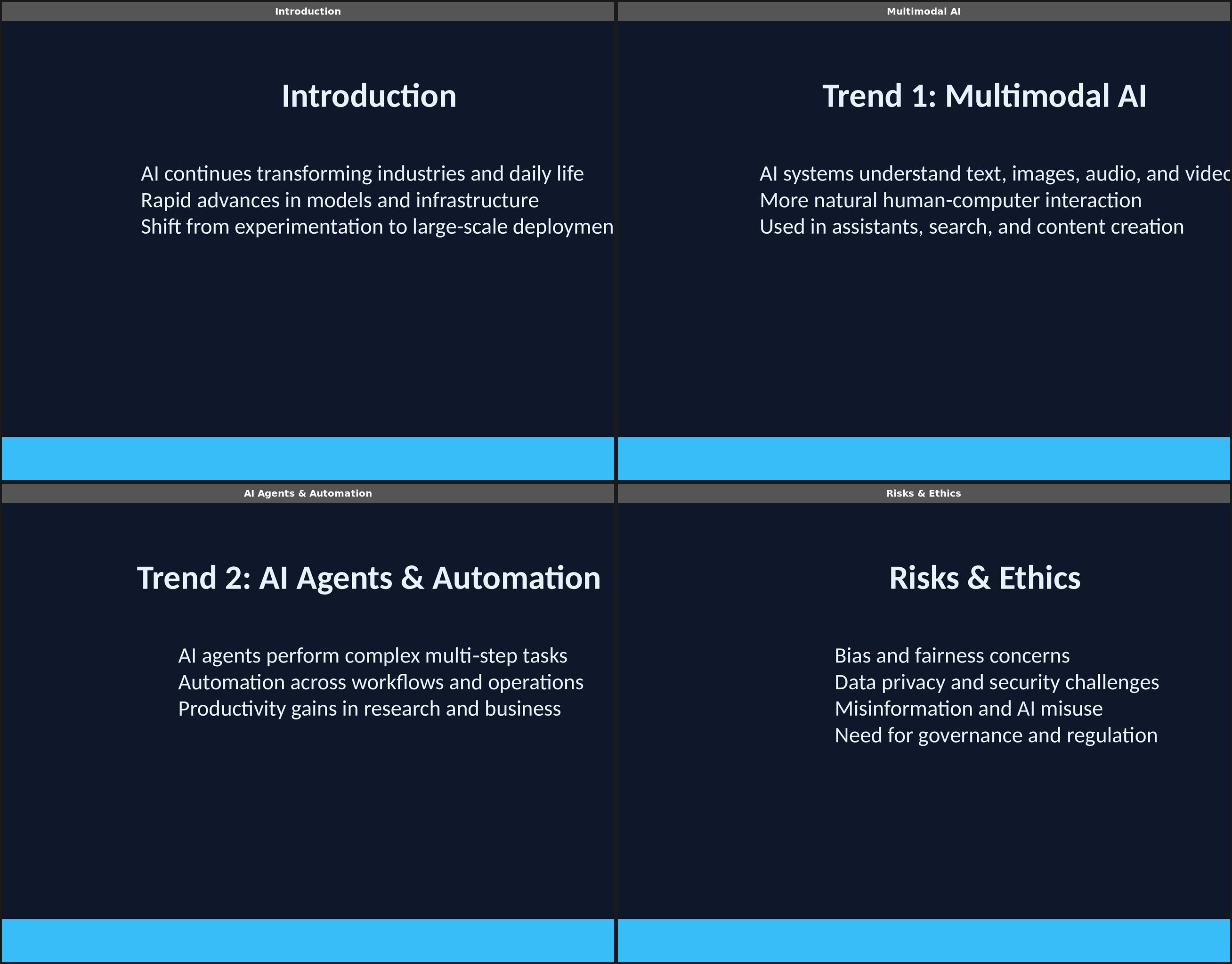
ChatGPT delivers a downloadable .pptx file in roughly 30 seconds — the fastest complete file in this test. No setup questions, no preference selection, no waiting. Type a prompt, get a file.
The speed comes with a tradeoff. Every single slide follows the same layout: bold title at top, three bullet points in the middle, cyan accent bar at the bottom. No images, no charts, no icons, no layout variation. This isn't ChatGPT being lazy — it generates slides by writing Python code (python-pptx) behind the scenes, and that library has no access to design templates, image libraries, or layout algorithms.
Content is reasonably well-structured: 8 topics with clear headings and organized talking points. The limitation is that ChatGPT relies entirely on its training data, with no live web search. For a fast-moving topic like AI trends, this means the content can feel generic or outdated.
ChatGPT is the most accessible AI tool in the world, and for brainstorming structures, writing speaker notes, or generating a rough internal draft where visual polish doesn't matter, it gets the job done faster than anything else. Just don't expect to present the output without significant visual rework.
Read our full ChatGPT review →
Gemini Canvas
Clean design with real layout variety and seamless Google Slides export, but sparse images and surface-level content.
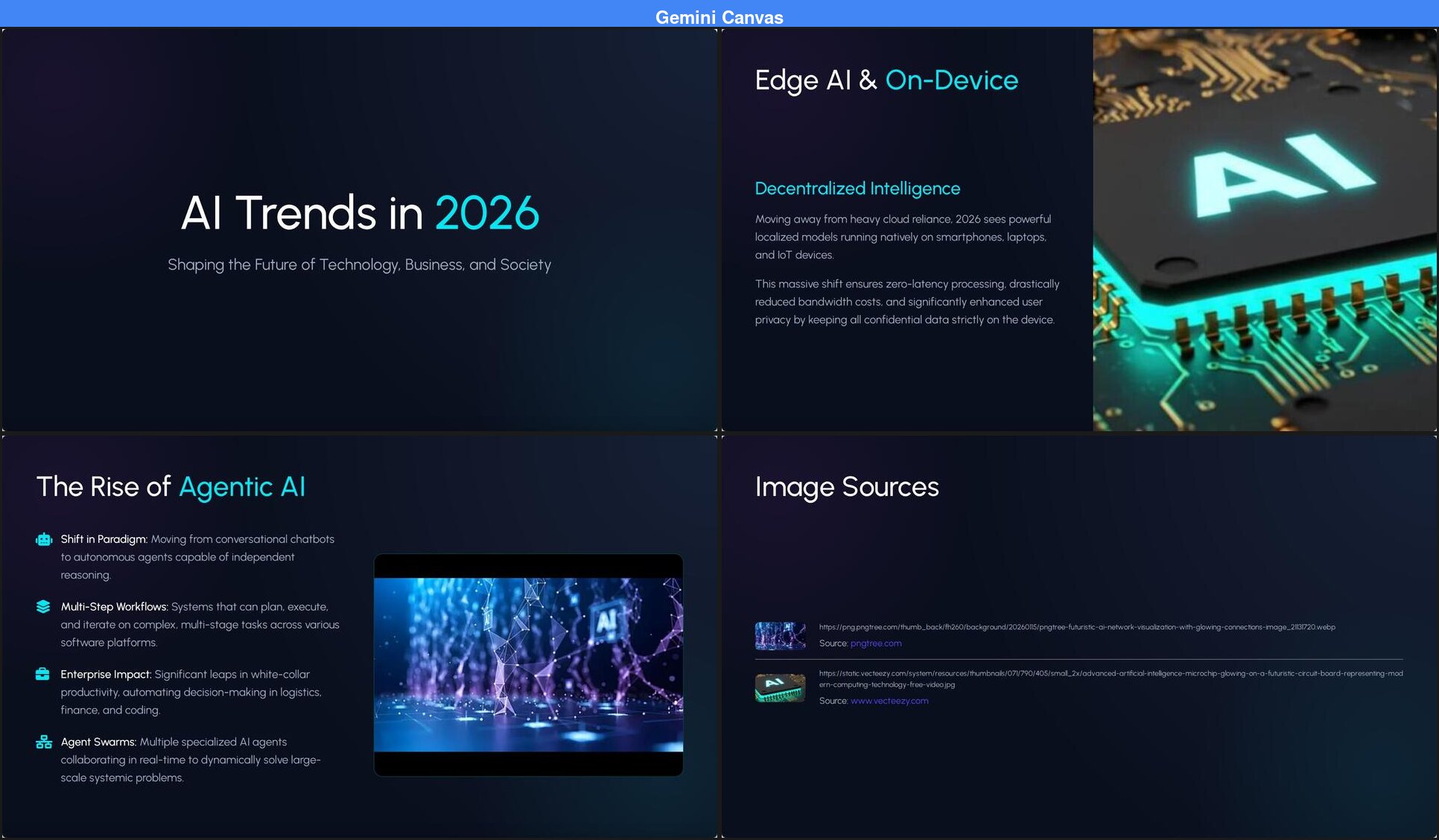
Gemini Canvas is a meaningful step up from ChatGPT. You paste a prompt, wait about 3 minutes, and get a 9-slide deck with no two slides using the same layout. The design is clean — dark background with cyan accents, consistent typography, and a horizontal bar chart showing "Enterprise AI Adoption by Sector" with actual percentages.
That chart is significant. Gemini is one of only four tools in this test (along with Claude, Manus, and PageOn) that included any data visualization in the output. It also integrates seamlessly with Google Slides — one click to export and start editing in a tool you already know.
The gaps are in content depth and visual assets. Only 2 of 9 slides include photographs, and both are low quality — blurry with visible cropping artifacts. The closing slide features a fabricated website URL (www.aitrends2026.tech) that doesn't exist. Content stays at a surface level without cited sources or specific statistics.
Gemini doesn't ask about your audience, purpose, or visual preferences before generating. It takes the prompt and runs. This means faster output but less tailored results — the title repeats the prompt almost verbatim rather than adapting to a specific audience. Editing requires exporting to Google Slides first; there's no in-browser editing in Gemini itself.
For quick drafts in the Google ecosystem, Gemini Canvas is genuinely useful. The design quality is real, the Google Slides integration is seamless, and the price is right.
Read our full Gemini Canvas review →
Claude
The most data-dense slides from any chatbot — multiple chart types and specific numbers — but zero photographs and slow generation.
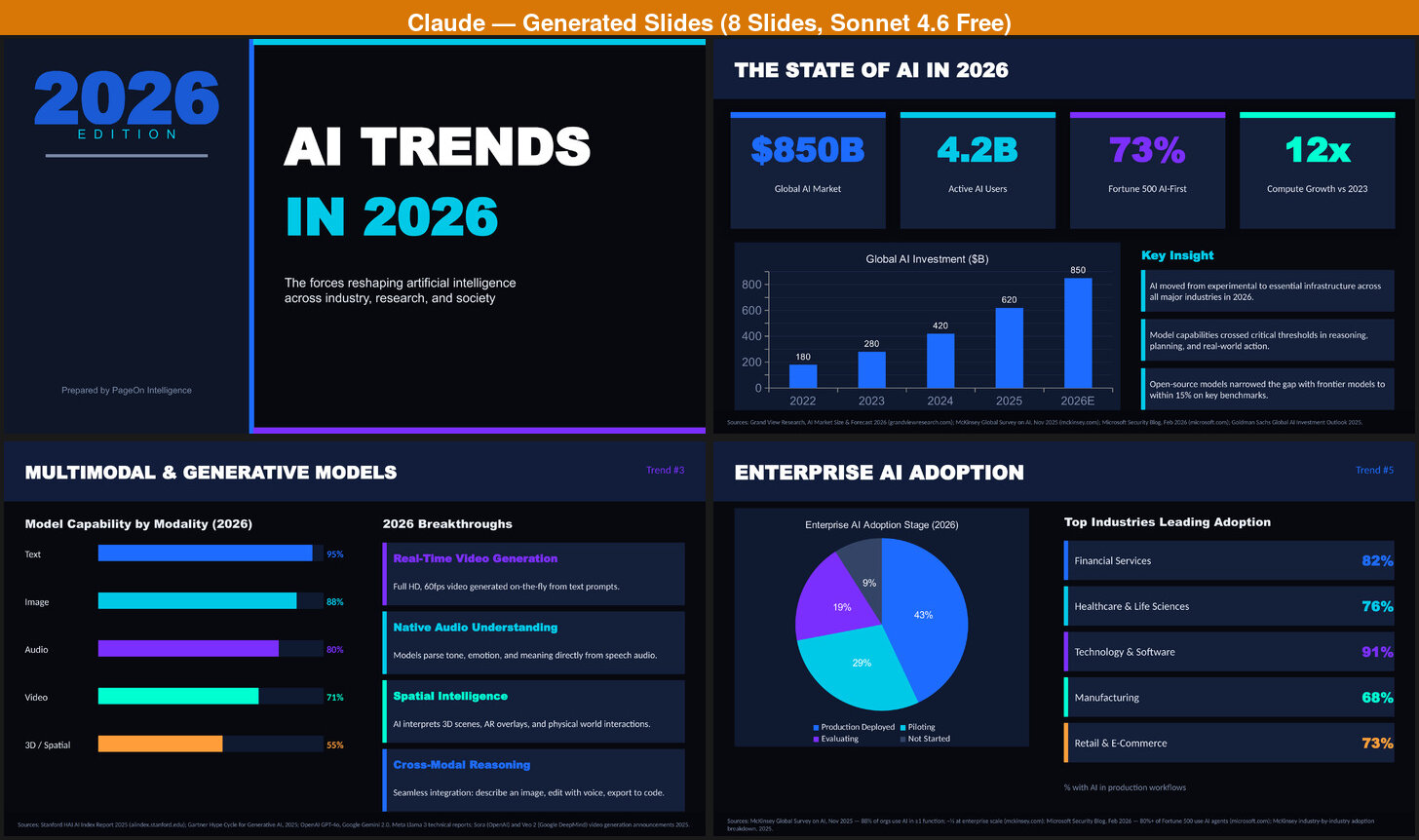
Claude produces the most sophisticated code-generated slides of any general-purpose AI in this test — and it does it on the free tier. The 8-slide deck includes a bar chart showing AI investment growth from $180B to $850B, progress bars for model capability by modality, a pie chart of enterprise adoption stages, and industry ranking bars. Every slide uses a different layout, with specific data points woven throughout.
Like ChatGPT, Claude generates slides through Python code (python-pptx), resulting in a downloadable .pptx file. Unlike ChatGPT, the code it writes is significantly more sophisticated — multiple layout types, color-coded sections, and structured data presentation rather than just text bullets.
The tradeoff is visual polish. Zero photographs across all 8 slides — just geometric shapes and gradient backgrounds. The output looks like a well-made corporate template: professional, competent, but not visually compelling. Generation takes about 4 minutes, and if you ask Claude to add images, expect another 10+ minutes of watching it struggle with broken image links and fall back to generating dark gradient placeholders with PIL.
Claude's sweet spot is structured data. It generates more specific numbers and more chart types than any other chatbot — bar charts, pie charts, progress bars, stat callouts — all from one prompt. The specificity is a clear step above ChatGPT and Gemini's generic talking points. If you need a content-heavy starting point and plan to rebuild the visuals elsewhere, Claude gives you more to work with — for free.
Manus
Deep web research with real data from named sources, but 10+ minutes to generate and heavy layout repetition throughout.
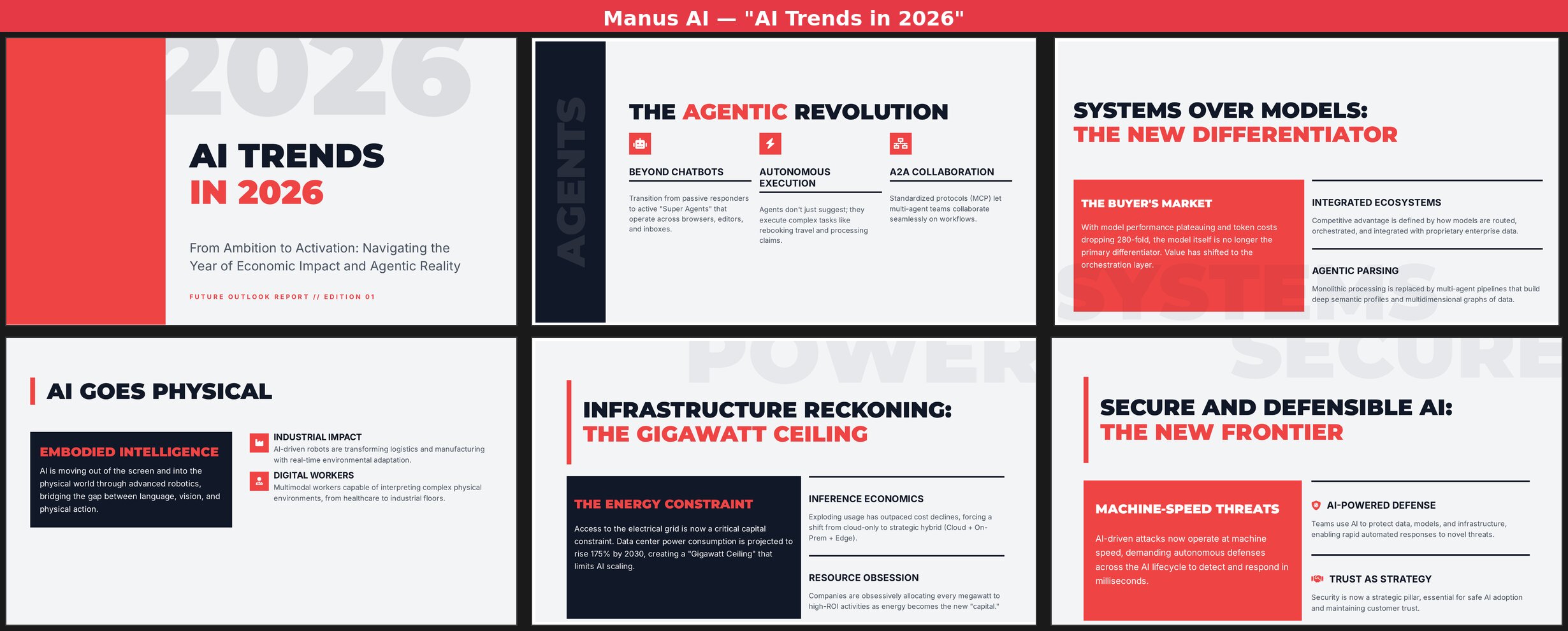
Manus takes a fundamentally different approach. It's an AI agent that researches your topic in real time — you can watch it searching the web, pulling data from Deloitte Tech Trends, Stanford HAI reports, and KPMG forecasts. The research transparency is impressive, and the content reflects it: specific data like "280-fold token cost drops" and terms like "Objective-Validation Protocols" that show genuine depth.
The first slide appears after about 2 minutes, and slides stream in one by one — you can review earlier slides while later ones are still generating. But the full 11-slide deck takes over 10 minutes to complete. The initial output includes one basic bar chart, but when we asked Manus to add more, it took another 7-8 minutes for 3 additional charts — nearly as long as the original generation.
Visual design is the clear weakness. Nearly every content slide follows the same pattern: bold title with 2-3 text cards on a grey background with red accents. Zero photographs, zero illustrations, one color scheme throughout. It's not as extreme as ChatGPT's literally identical slides, but the repetition is heavy enough that the presentation reads like a text document formatted as slides.
Manus doesn't pause at the outline stage to ask for your input. It goes straight from prompt to generating slides without a confirmation step — which means it's making assumptions about what you want to emphasize.
If you value research depth above all else and plan to completely redesign the visuals, Manus delivers substance that most tools can't match. Just budget the time accordingly.
PageOn
Varied layouts, real photos, data charts, and web research in one output — the most complete result, with AI setup that adapts to your input.
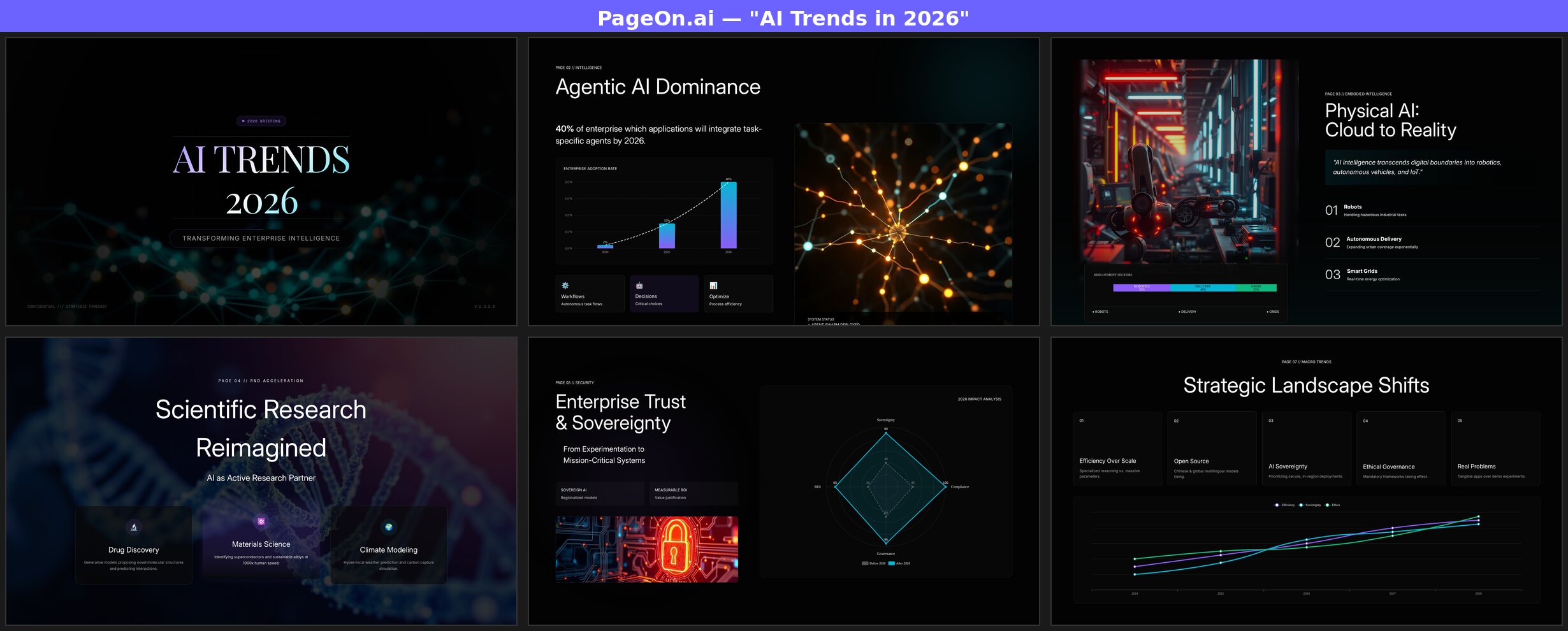
PageOn takes a different path from the start. Instead of immediately generating, it opens a preference panel — theme, images, audience, purpose — with multiple-choice options you click through in seconds. Then it shows a full outline for review before generating anything. This adds about 30 seconds of active decision-making but means the output actually reflects what you need.
After confirming, the first slide appears in about 10 seconds, and slides stream in over 2-3 minutes. The 7-8 slide deck uses a different layout on every page: title with centered typography, data charts with explanatory cards, full-bleed photographs with text overlays, multi-column layouts, and timeline graphics. Five or more slides include real photographs that you selected from a web image search grid before generation.
Content is research-backed with live web search — the tool searches the web during generation and weaves specific data points into the slides. Multiple chart types appear throughout: line charts, radar charts, and bar charts with populated data. The title adapts to the audience: instead of repeating the prompt, PageOn generated "AI Trends 2026: Strategic Imperatives for Business Leaders" based on the audience and purpose selections.
After generation, you can click any text element and edit directly in the browser — no export required. A formatting toolbar appears with font controls and styling options. Export to PPTX, PDF, or PNG when you're satisfied.
The one shared weakness with every other tool: the closing slide generates fabricated contact details and CTAs. Always review and replace the last slide's content with your own information.
What About Beautiful.ai, Tome, and Other AI Presentation Tools?
We tested seven tools for this comparison, but there are others worth mentioning.
Beautiful.ai is a dedicated presentation tool that combines AI generation with smart templates — you can type a prompt and get a full deck, then its "Smart Slides" automatically reflow layouts as you edit content. It also has a DesignerBot AI assistant that can add charts, refine content, and convert documents into slides. It's been around since 2018 and has a loyal user base. We didn't include it in this round but may add it in a future update. Beautiful.ai offers a 14-day free trial, then starts at $12/mo (Pro, billed annually). Students with .edu emails get a free year.
Tome has discontinued its presentation product. If you're searching for a "Tome alternative," any of the seven tools above are currently active — Gamma, Canva, and PageOn are the closest in terms of being dedicated presentation platforms.
Other tools like SlidesAI, Plus AI (both Google Slides add-ons), Visme, and Pitch also offer AI presentation generation. We may expand this comparison to include them in a future update.
What We Noticed
After running the same prompt through seven tools, a few patterns stood out.
Speed and depth trade off against each other
The two fastest tools to show first content — Gamma and PageOn, both under 10 seconds — take very different paths from there. Gamma finishes its full deck in about a minute with surface-level content. PageOn takes 2-3 minutes because it's running web searches and building data visualizations in real time. ChatGPT delivers in 30 seconds, but with no images, no charts, and no live data. Manus spends 10+ minutes on deep research but produces the least visual output. There's no free lunch — the question is where you want to spend the time.
Streaming changes the experience
Tools that show slides as they generate (Gamma, PageOn, Manus) feel significantly faster than tools that make you wait for the full result (ChatGPT, Claude, Gemini, Canva). Watching a 3-minute generation with visible progress is a different experience from staring at a blank screen for 3 minutes. Gamma and PageOn both show the first slide in about 10 seconds, which means you start reviewing and thinking about edits while the rest is still generating.
Editing is where tools really split
The initial generation is just the starting point — most presentations go through multiple rounds of editing before they're ready. Here the tools split into three camps. The general-purpose AIs (Claude, Manus) understand complex instructions — "add a chart comparing adoption rates" — but are slow: Claude takes about 4 minutes per edit, Manus 7-8 minutes. The template-driven tools respond faster but hit walls quickly: Gamma fabricated citations when asked to add them, and Canva generated three entirely new presentations instead of modifying the existing one. PageOn sits between — simple edits like text replacement take 10-20 seconds, while complex edits involving web search or content regeneration take 2-3 minutes. When you're iterating through a dozen edits to get a deck right, the difference between 4 minutes and 20 seconds per edit is the difference between an hour and a few minutes.
The tools that ask first get closer on the first try
Most tools take your prompt and immediately start generating — ChatGPT, Claude, Gemini, and Manus all make assumptions about your audience, visual style, and what to emphasize. Gamma and Canva have pre-generation settings — Gamma offers text density, theme, and image source plus an outline review; Canva offers style themes and audience types — but these are static menus, the same fixed options regardless of what you type. PageOn is the only tool that generates its setup options based on your input: the choices it presents, including recommended defaults, are different depending on your topic and context. You can accept the defaults with a few clicks or adjust them. That 30 seconds of intelligent confirmation means the first output is already shaped around your actual needs, not the tool's assumptions.
Nobody gets the closing slide right
Every tool we tested fabricated some part of the closing slide — fake email addresses, invented websites, fictional CTA buttons. This is a shared weakness of AI-generated presentations. Always plan to manually replace the last slide with your actual contact information.
FAQ
Can AI actually make presentations?
Yes, but the quality range is enormous. At one end, ChatGPT generates a text-only .pptx in 30 seconds. At the other, tools like PageOn produce full decks with varied layouts, real photographs, and data charts in 2-3 minutes. "AI presentation" means very different things depending on the tool.
What is the best free AI presentation maker?
All seven tools have free tiers, but the limits vary wildly. Gamma's 400 free credits (~10 full presentations) with a polished editor make it the most generous for presentations specifically. Claude and ChatGPT offer daily message allowances that work fine for occasional use. Gemini's free tier is limited to 5 Pro messages per day. Manus gives 1,000 starter credits plus 300/day, but complex tasks can eat 500-900 credits each. PageOn's free tier is limited to 1 project. Paid plans range from $7.49/mo (PageOn annual) to $20/mo (ChatGPT, Claude, Manus).
Can ChatGPT make PowerPoint presentations?
Yes — ChatGPT generates real .pptx files you can download and open in PowerPoint or Google Slides. The limitation is visual: every slide uses the same layout with no images, charts, or design variety. It works best as a content outlining tool rather than a presentation design tool. See our full ChatGPT test →
Which AI presentation tool has the best design?
For fully automated design with no manual input, PageOn produced the most visually varied output — different layouts on every slide, real photographs, and multiple chart types. Canva produces clean individual slides but with heavy layout repetition. Gemini has good variety but sparse images. Gamma is fast but repeats 3 layout patterns. Claude and ChatGPT produce functional slides through code, not a design engine.